






Categories
Uncategorized

What’s New in WordPress 7.1? (Features & Screenshots)

WordPress 7.1 is finally here 🥳, and we have been closely following its development.

The new version launched on August 19, 2026, timed with WordCamp US. Its focus is on how you collaborate, style, and manage media on your WordPress website, and it fixes a long list of everyday annoyances along the way.

Whether you run a small blog or a large multi-author site, WordPress 7.1 has changes that will affect how you work every day.
Overview of the WordPress 7.1 release

ℹ️ Important: As always, please don’t forget to create a complete WordPress backup before updating to the new release. If you are not using managed WordPress hosting, then you will need to run the update yourself.

Here is everything that’s new in WordPress 7.1:

Collaborate Better With the Upgraded Notes

The Notes feature arrived in WordPress 6.9 as a simple way to leave comments on blocks. WordPress 7.1 turns it into a proper feedback system.

The most useful addition is @mentions. You can type ‘@’ inside a note to bring up a searchable list of collaborators and tag someone directly.
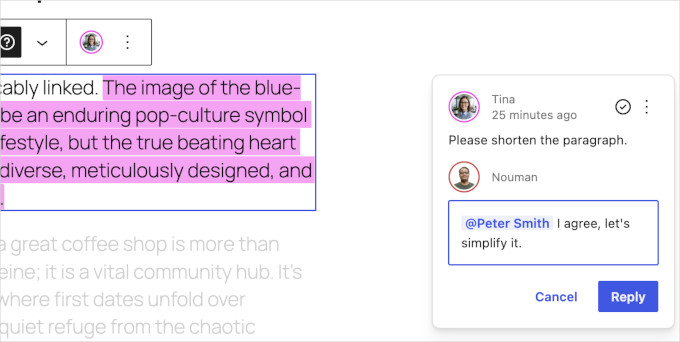
Tag team members with @mentions

Even better, WordPress now sends an email notification to the person you tagged. This addition landed late in the release cycle, and it completes the feature.

Your teammate no longer needs to keep the editor open to know that feedback is waiting. The email brings them straight back to the right post.

You can also leave inline notes. Instead of attaching a comment to an entire block, simply select a specific sentence or phrase and leave a note on just that text.

The selection stays highlighted, so everyone can see exactly which words the note refers to. In our testing, this removed a lot of guesswork from editorial feedback.

Other Notes improvements include:

  • Multiple threads: You can start more than one conversation on the same block.
  • Text formatting: Notes now support bold, italic, code, links, and emoji.
  • Show more / show less: Long notes collapse by default to keep the sidebar tidy.
  • Private by design: WordPress stores notes as a special comment type, and 7.1 now excludes them from your public comment feeds.

These changes make Notes genuinely useful for teams, agencies, and multi-author blogs. It is a solid step toward a better editorial workflow inside WordPress itself.

Share a Link to Any Revision

Visual revisions, which were introduced in WordPress 7.0 have been improved as well. They now include a new feature to share links to individual revisions.
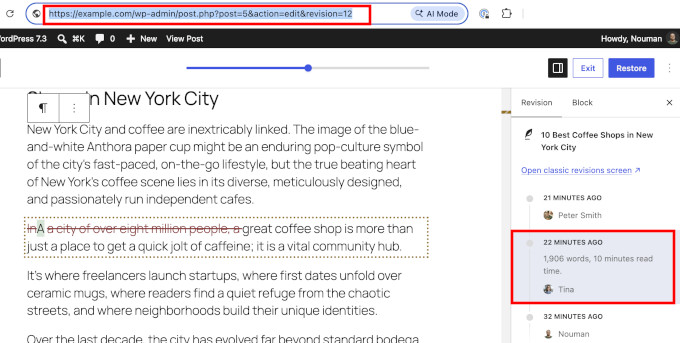
Sharebale revision link

For example, let’s say that you want to show a team member which changes were made to an article. You can now open the revisions screen, pick the exact version, and copy the link from your browser toolbar.

You can then share that link and when opened, the link will take users to the exact revision with changes highlighted.

Visual revisions also get a new picker layout in this release. It makes browsing your edit history easier, with color-coded changes carried over from WordPress 7.0.

Responsive Styling Without Writing CSS

This is the feature we are most excited about. Responsive styling has been one of the longest-standing requests in the block editor, and WordPress 7.1 finally delivers a first version.

You can now define how a block looks at different screen sizes directly in the editor. For example, you can set a smaller font size for headings on mobile without writing a single line of CSS.

Here is how it works: Click the device preview icon in the editor’s top toolbar and turn on the new ‘Responsive styles’ option.
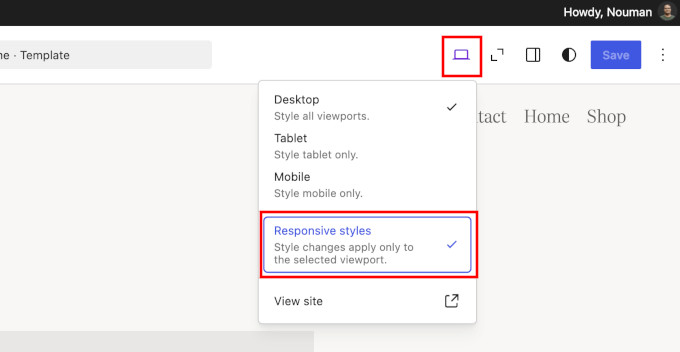
Responsive styles in WordPress 7.1

Now, switch the preview to Tablet or Mobile. From this point, any style change you make applies only to that screen size.

During testing, we selected a smaller font size for a button in the Tablet view, and the desktop design stayed untouched. WordPress also shows a small badge in the block settings panel, so you always know which viewport you are styling.
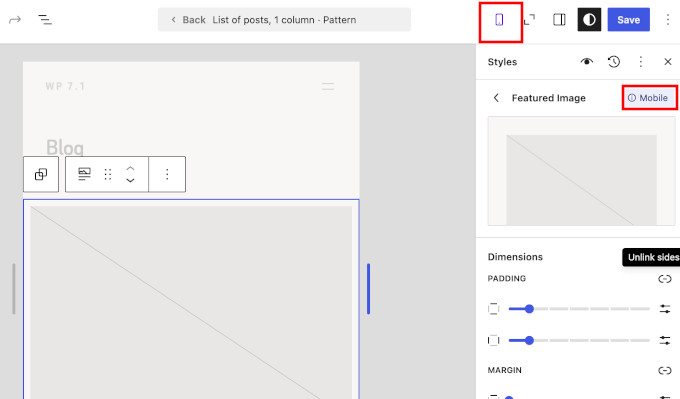
Responsive design and device indicators in site editor

It works on two levels. You can set responsive styles in Global Styles, which apply to every instance of a block across your site, or you can style an individual block on a specific page.

The editor canvas is also more flexible. Instead of being limited to the Desktop, Tablet, and Mobile presets, you can drag the canvas to any width and watch your blocks respond in real time.
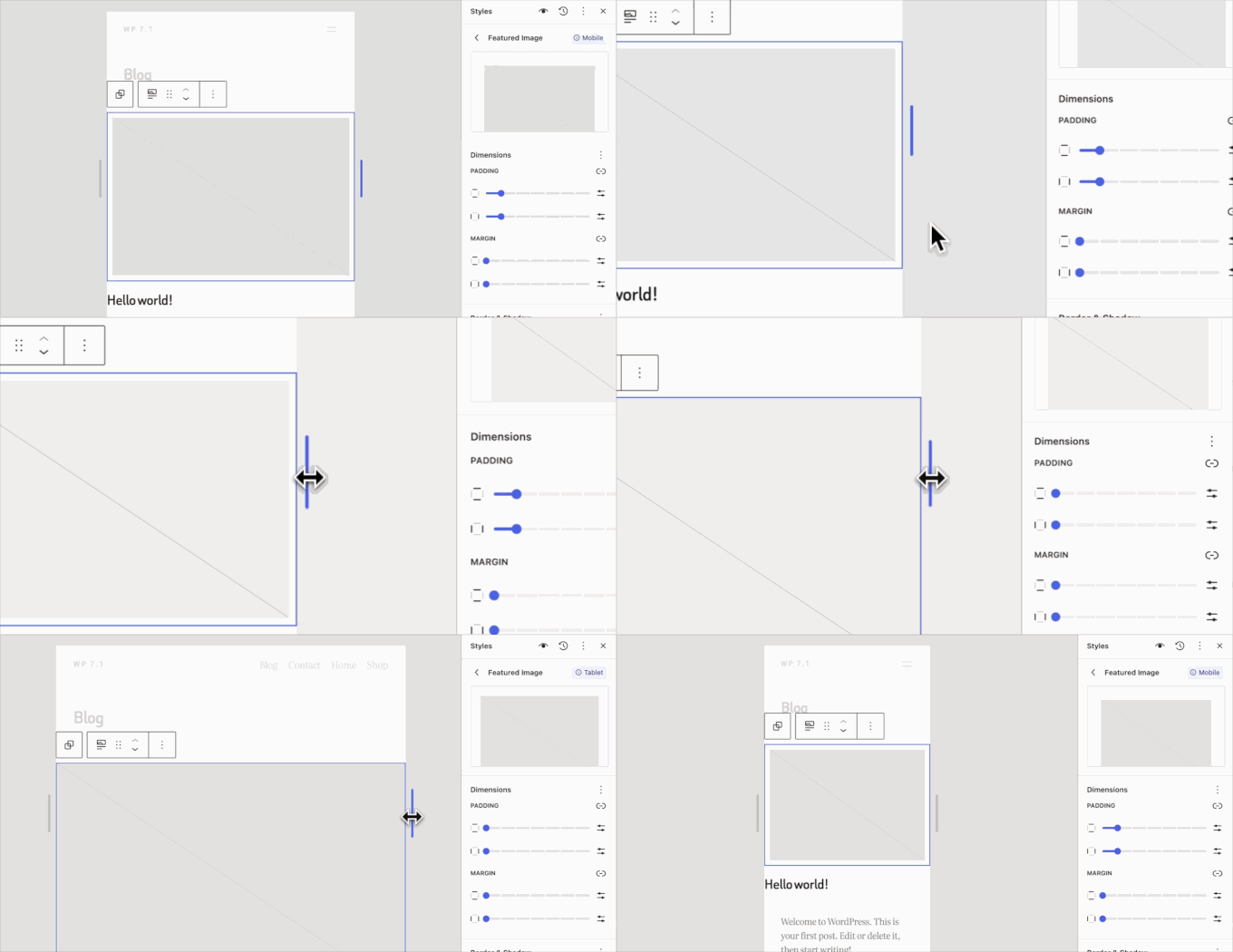
Drag to adjust device breakpoints

Theme developers can even define their own breakpoints in theme.json. That way, the preview widths match the theme you are actually using.

Style Hover and Focus States for Buttons

Alongside responsive styling, WordPress 7.1 introduces interactive state styling.

A new ‘State’ dropdown lets you visually style how blocks respond to interaction. For example, you can set a different background color for a button’s hover, focus, or active state and preview the change live in the editor.
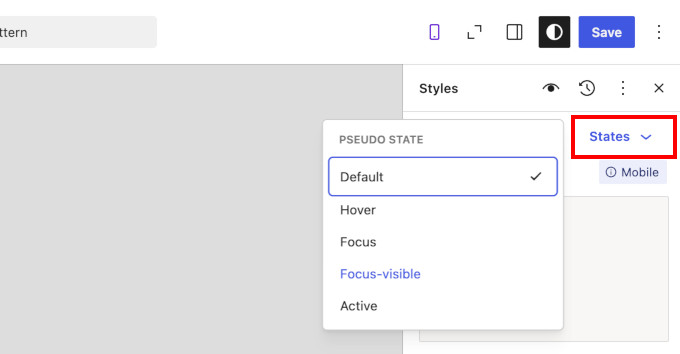
Interaction styles in WordPress 7.1

Previously, changing a button’s hover color required adding a custom CSS snippet. Now, it can be easily done inside the editor itself.

There is also a thoughtful refinement when you apply local style changes globally. WordPress now shows a quick review step, so you can choose exactly which modified styles to apply across your site and keep the rest as local overrides.

New Tabs Block

WordPress 7.1 adds a Tabs block that many users have been asking for.

Tabs let you organize content into clickable panels instead of showing everything at once. They are great for product specifications, FAQs, or comparing options without making a page feel long.
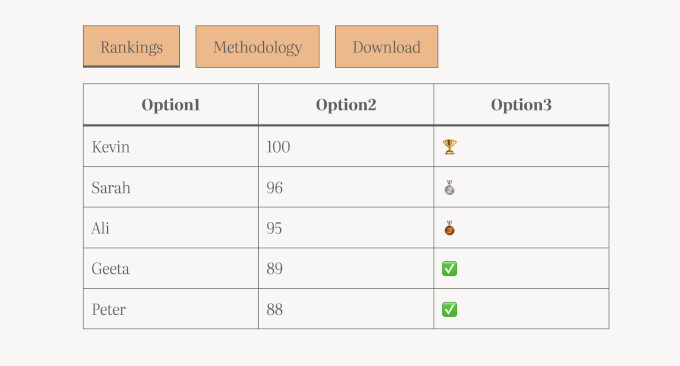
The new Tabs block in WordPress 7.1

The final release has also added toolbar buttons for reordering tabs, which was a rough edge we noticed during the beta. Previously, you had to add tabbed content using a plugin, so it’s great to see this functionality now available as a core WordPress block.

We also like that accessibility was not an afterthought here. The block follows the W3C ARIA Authoring Practices Guide, which means it works properly with keyboards and screen readers out of the box.

New Playlist Block

The second new block in WordPress 7.1 is the Playlist block. It lets you add a collection of audio files to any post or page, complete with track metadata, artwork, and a waveform visualization.
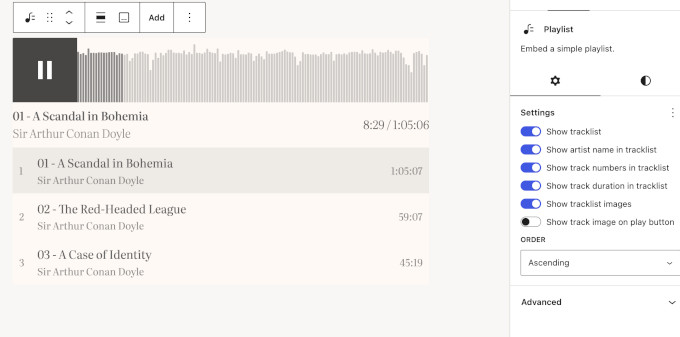
New playlist block in WordPress 7.1

This is a nice upgrade for musicians, churches, educators, and anyone who publishes audio. If you run a podcast with WordPress, you can now list recent episodes in a clean player without a separate plugin.

A New Image Editor in WordPress 7.1

WordPress 7.1 replaces the old inline cropping tool with a dedicated Media Editor modal.

The entry point stays familiar. You still click the Crop button on an Image block, but now a full editing modal opens with freeform cropping, aspect-ratio presets, flip and rotate controls, and metadata editing in one place.
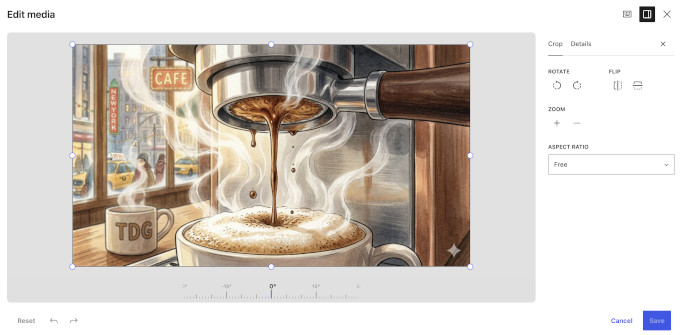
New image editor in WordPress 7.1

In our testing, the magnified crop view was the standout. It makes fine adjustments much easier, and the crop handles snap cleanly to pixels.

The new editor also works with the Cover block, so you can crop a background image right where you use it.

This will not replace a full photo editor. However, for the basic image editing most site owners need, being able to make them directly in the editor is a big usability win.

Smoother and Smarter Media Handling

WordPress 7.1 continues the client-side media processing work that started in WordPress 7.0. In simple terms, your web browser does the heavy lifting of processing images before they reach your server.

This release expands format support in a meaningful way. WordPress can now handle HEIC photos, which is the default format on iPhones, along with UltraHDR, AVIF, and WebP.

Until now, iPhone users often needed a HEIC to JPG conversion plugin just to upload their photos. With 7.1, that friction mostly disappears.

Uploads are also more resilient. If your internet connection drops mid-upload, then the upload queue pauses and automatically resumes when you are back online.

There are also several tiny improvements that make everyday WordPress tasks a little easier:

  • Smarter galleries: A new dynamic Gallery mode can automatically pull in and sort media already attached to the current post.
  • Attached images in the inserter: After you upload images to a post, they appear in a new ‘Attached images’ section, so you do not have to dig through the whole Media Library.
  • Infinite scrolling: The Media Library grid now loads more items automatically as you scroll. WordPress turns this on by default, and you can bring back the old page-by-page view from your user settings if you prefer it.
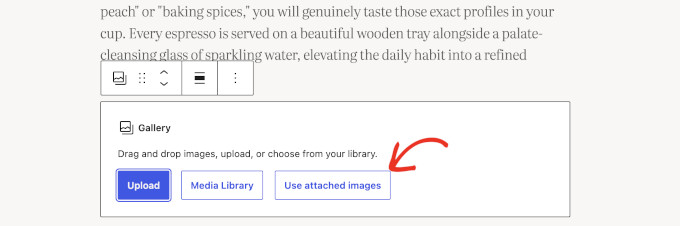
Use attached images in Gallery block

Together, these changes mean fewer upload errors and less load on your server. That is especially good news if you are on a budget WordPress hosting plan.

The Admin Toolbar Now Stays Visible When Editing

WordPress 7.1 makes the admin toolbar persistent. It now remains visible in the Site Editor and the Block Editor, instead of disappearing when you start editing.
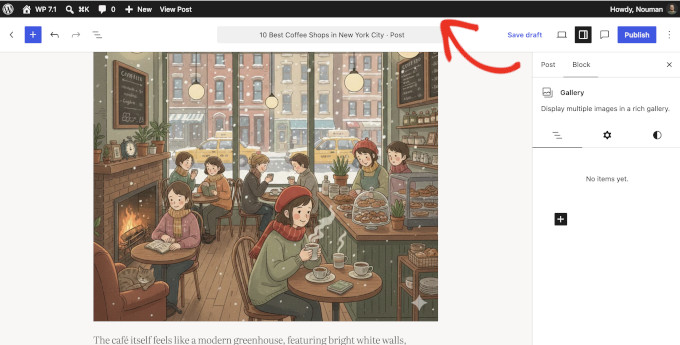
Consistent admin bar in WordPress 7.1

The toolbar itself has also gotten a design cleanup as part of this change:

  • A clear back button (chevron) replaces the confusing W logo that used to double as a back button.
  • Your site icon now appears in the toolbar, and your profile avatar is a circle instead of a square.
  • Modern SVG icons replace the old Dashicons.

In our testing, this made moving between the editor and the rest of the admin feel much more predictable. Each icon now means one thing everywhere.

The ‘Howdy’ greeting survived another release. The core team discussed removing it during this cycle, but the change did not make it into 7.1.

If you prefer a clean writing canvas, then don’t worry. The toolbar stays hidden in Distraction Free mode.

A More Personal And Easily Navigable Admin

Beyond the toolbar, WordPress 7.1 includes a set of smaller admin improvements that add up.

Command palette improvements. The Command Palette (Ctrl+K on Windows, Command+K on Mac) now groups results into Recent, Matching, and Suggestions sections. WordPress saves your recently used commands to your preferences, so they persist across sessions.
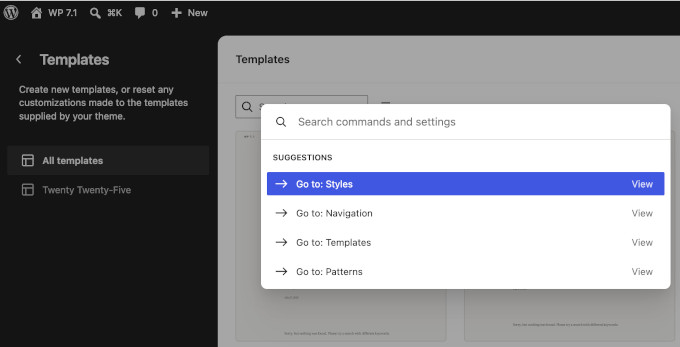
Command palette contextual suggestions

Your admin color scheme in the Site Editor. The Site Editor reflects your chosen admin color scheme instead of always using a fixed dark sidebar. It is a small thing, but it makes the whole admin feel consistent.
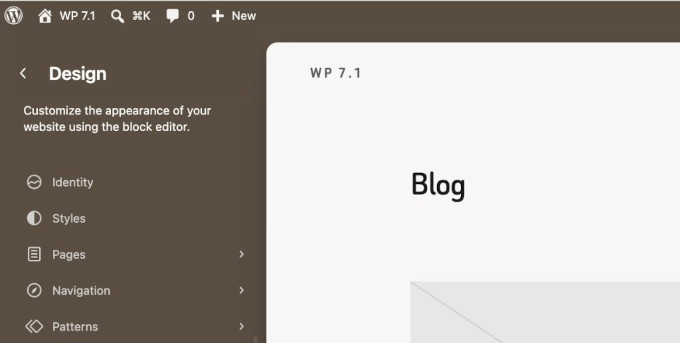
Site color matches admin color scheme

A dedicated Identity section. Site identity settings like your title, tagline, logo, and site icon now live in their own Design » Identity section in the Site Editor. You no longer need to hunt through Settings and templates to update these basics.
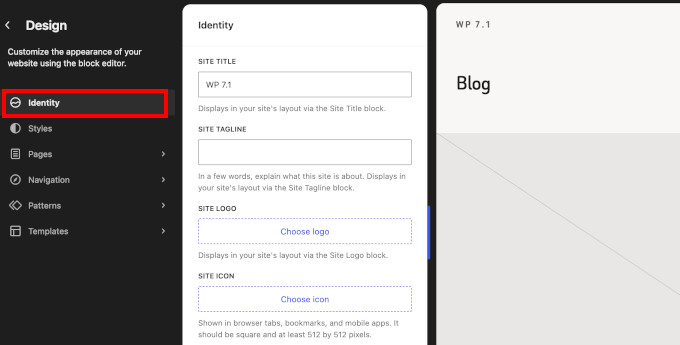
New 'Identity' tab in site editor

Excerpts in the Posts list. The Posts list view now shows a short excerpt for each entry, making it easier to tell similar posts apart.

Select many items at once. In the Site Editor’s list views, you can now click one item, hold Shift, and click another to select the whole range. If you manage hundreds of pages or media files, then this saves you time on bulk actions.

Change a comment’s parent. The Edit Comment screen adds an editable ‘In reply to’ control, so you can finally fix comments that ended up as replies in the wrong place.

Block Improvements in WordPress 7.1

Several existing blocks get meaningful upgrades in this release:

  • Background gradients and images work together. You can now layer a gradient over a background image on the Group block and several other blocks. This is handy for keeping text readable over hero images.
  • Text shadows in Global Styles. Themes and users can now configure text shadows through theme.json and Global Styles.
  • Editable content inside the HTML block. The HTML block supports editable nested blocks. This is especially useful when working with AI-generated layouts, which often arrive as custom HTML.
  • Mark images as decorative. A new toggle on the Image block lets you mark purely decorative images so that screen readers skip them. Decorative images with meaningless alt text are one of the most common accessibility mistakes, and this makes the fix easy.
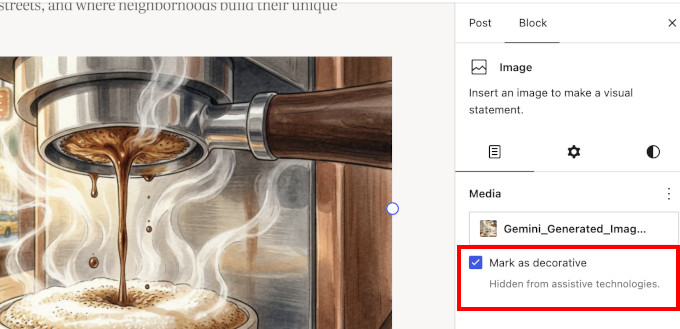
Mark image decorative
  • Smarter shortcode handling. Pasting or converting an embed shortcode now creates a proper Embed block instead of leaving raw shortcode text behind.
  • Icon block upgrades. The Icon block now includes controls to flip or rotate icons, starts with a sample icon instead of an empty placeholder, and includes an icon picker organized by collections. Plugins and themes can now register their own icon sets, so expect branded icon libraries from your favorite plugins.
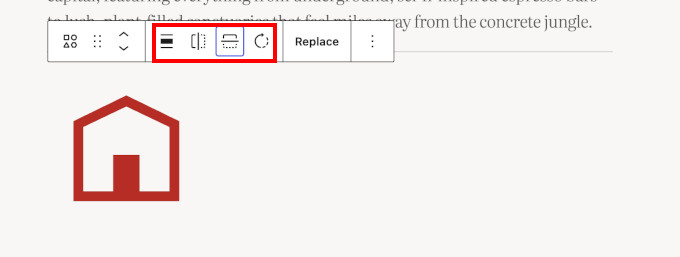
Icon block options
  • Grid transforms. Columns and Gallery blocks can now transform into Grid layouts while preserving their content.
  • Query Loop exclusion. The Query Loop block gets an option to exclude the current post, so your “related posts” section never recommends the post the visitor is already reading.

Changes to Look Out for Before the Update

Most sites can update to WordPress 7.1 without drama. However, if you run a large site with many plugins, then a few under-the-hood changes deserve your attention before you click update.

The editor is now always iframed. WordPress 7.1 completes a multi-year effort to place the editing canvas inside an iframe, and this now applies even when plugins register older-style meta boxes.

In simple terms, the editor content is loaded in a separate frame from the rest of the WordPress admin screen. This keeps admin styles and scripts from affecting the editing canvas as easily, which can make the editor more consistent and stable.

Most users won’t notice the iframe itself. Instead, you’ll mainly benefit from a more predictable editing experience.

There is a compatibility consideration, though. Older plugins that add custom scripts or styles to the editor may not work as expected with the iframe. Blocks also need to use Block API version 3 to render correctly inside the iframe.

WordPress 7.1 updates jQuery UI to version 1.14.2. jQuery UI is a JavaScript library that many older admin plugins use for things like date pickers and drag-and-drop screens. If a plugin on your site has not seen an update in years, then test it on staging first.

WordPress now enforces multisite upload limits everywhere. On WordPress multisite networks, space quotas now also apply when a plugin imports media from a URL (a process called sideloading). Previously, this route quietly bypassed the per-site storage limit, so network admins can expect quotas to hold from now on.

Our advise remains the same: always create a complete backup of your website before hitting update.

What Didn’t Make It Into WordPress 7.1?

A few features we covered during the beta cycle did not ship in the final release.

The core team cut the ‘On This Day’ widget. We previewed this dashboard widget in our beta coverage, and we liked it. The team decided it needs more work, so it may return in a future release.

Real-time collaboration is still in development. Google Docs-style co-editing received a lot of testing during the 7.1 cycle, but the team held it back to keep working on conflict handling and compatibility. You can try an early version in the Gutenberg plugin.

The Classic block stays in the inserter. The team originally planned to hide the Classic block from the block inserter in this release. After community feedback, they reverted the change, so nothing changes for sites that still rely on it.

The team also pulled Unicode email address support during beta testing. That work continues in a community plugin for broader compatibility and security testing before it lands in core.

We think this caution is the right call. A collaboration feature that loses someone’s work would be far worse than a delayed one.

Under the Hood (Developer & Performance Updates)

WordPress 7.1 also ships several technical improvements for developers and site performance:

  • Faster editor startup: WordPress now preloads the REST API requests the editor needs on load, so the editor opens faster, especially on content-heavy sites. (#65636)
  • Icons API goes public: New functions like wp_register_icon_collection(), wp_register_icon(), and wp_get_icon() let plugins and themes register custom icon sets with server-side rendering and REST API endpoints. WordPress sanitizes SVGs against a strict allowlist. (Dev note)
  • Abilities API expansion: The machine-readable registry of WordPress capabilities, introduced in WordPress 6.9, gains filtering for wp_get_abilities(), execution lifecycle hooks, a unified public exposure flag, and client-compatible JSON Schema output. These are the plumbing that AI agents and external tools use to work with your site safely. (Dev note)
  • Block Bindings for List Items: Block Bindings now extend to the List Item block, so more content can connect to dynamic data sources like custom fields. (Details)
  • Speculative loading configuration: Hosts and developers can now configure speculative loading defaults (loading pages in the background before a visitor clicks) through environment variables and constants. (#65624)
  • Accessible tooltips: Core introduces a shared mechanism for accessible tooltips, replacing pointer-only title attributes in several screens. It is part of a 46-ticket accessibility push in this release. (Dev note)
  • Design system maturity: The wordpress/theme package introduces design tokens and a stable React ThemeProvider for consistent UI theming. (Dev note)
  • Author notification control: The notify_post_author filter now has the final say on post author notifications, which makes custom editorial notification setups more predictable. (Dev note)

For the complete list of developer changes, see the official WordPress 7.1 Field Guide.

Final Thoughts on WordPress 7.1

We have been following WordPress 7.1 from development to the final release. It may not have a single blockbuster feature, but it fixes a long list of everyday annoyances, and that matters more for most website owners.

Our favorite additions are the upgraded Notes and responsive styling. Tagging a teammate on an exact sentence, and knowing they will get an email about it, makes WordPress modern collaboration tool.

And styling blocks for mobile without touching CSS removes one of the last big reasons beginners needed custom code.

If you haven’t updated yet, then we recommend backing up your WordPress site first. Once you are in, set aside a few minutes to explore Notes, the revisions sharing, and the responsive styling options. They are easy to miss but genuinely useful.

If you liked this article, then please subscribe to our YouTube Channel for WordPress video tutorials. You can also find us on Twitter and Facebook.

The post What’s New in WordPress 7.1? (Features & Screenshots) first appeared on WPBeginner.
Categories
Music

Post Malone Is Engaged to Christy Lee

Christy Lee showed off her massive new diamond ring while celebrating the couple’s engagement with friends. Continue reading…​The Boot – Country Music News, Music Videos and Songs

Categories
Alaska News

Trump announces plans to fill Alaska’s third federal judge position, vacant for over two years

The east entrance of the James M. Fitzgerald United States Courthouse and Federal Building is seen on July 8, 2024. (Photo by Yereth Rosen/Alaska Beacon)

The east entrance of the James M. Fitzgerald United States Courthouse and Federal Building is seen on July 8, 2024. (Photo by Yereth Rosen/Alaska Beacon)

President Donald Trump announced plans to nominate Kyle Reardon, a federal magistrate judge and former prosecutor, to fill the last of three federal judge positions for the U.S. District Court for the District of Alaska.

Trump announced the nomination on social media on Tuesday, as well as picks for federal trial courts in Texas, Florida, Oklahoma, Kentucky and Louisiana. The move largely clears the backlog of judicial vacancies in red states, Bloomberg reported, setting the clock for the U.S. Senate to confirm appointments before the midterm elections may shake up majority power.

The Alaska federal judge seat has been vacant for over two years, since July 2024, when former federal judge Joshua Kindred resigned in disgrace following a judicial panel finding he sexually harassed and created a hostile work environment for his law clerks. 

If confirmed by the U.S. Senate, Reardon would become one of three federal judges in Alaska serving lifetime appointments. 

Reardon was one of a dozen candidates that expressed interest in the judgeship when U.S. Sen. Lisa Murkowski solicited applications last year. 

Reardon was appointed as chief magistrate judge for Alaska by Judge Sharon Gleason in September 2025. He is based in Anchorage and has served as a magistrate judge in Alaska since 2021, according to his resume. Magistrate judges are appointed by district court judges to four-year terms, and oversee a variety of judicial proceedings supporting the federal courts. They have many of the same powers as federal judges to hear criminal and civil cases. 

Over the last two years, Alaska’s two U.S. senators have been split about the selection process and who to nominate for the federal judgeship. In 2023 U.S. Sen. Dan Sullivan created the Alaska Federal Judiciary Council to vet candidates for vacant federal judge positions, a special committee designed to serve as an alternative to the Alaska Bar Association’s traditional review process.  

Under longstanding Senate tradition, judge picks normally advance only with the assent of both home state senators.

On Wednesday, both of Alaska’s Republican senators issued statements of support for Reardon. 

“Kyle brings extensive knowledge of both our state and our court system to the federal bench, having served the District of Alaska as a federal prosecutor and U.S. Magistrate Judge, a position he has held in Alaska for the past five years,” Sen. Lisa Murkowski wrote.

“His extensive experience, professionalism, and judicial temperament make him exceptionally well-qualified for this role,” she said. “I thank the President for nominating Kyle and helping bring Alaska’s District Court back to full capacity.”

A spokesperson for Murkowski’s office said Wednesday she has recommended and advocated for Reardon since the beginning of Trump’s second term in 2025, but declined to give more information about the delay in his appointment.

Murkowski shared a list of candidates who expressed interest in the role with members of the Alaska Bar Association who weighed in on each in a survey. For Reardon, 21% of the 407 total respondents said he was qualified, well qualified or extremely well qualified. One percent said he was not qualified, and 75% responded “don’t know.”

U.S. Sen. Dan Sullivan also praised the nomination, but his office also did not respond to requests for comment on the delay on Wednesday.

“Kyle has a strong background of public service in the law and the military,” Sullivan wrote. “Kyle offers a wealth of legal experience, a deep understanding of the numerous federal laws that uniquely impact Alaska, and a commitment to the principle that a judge’s role is to interpret the law, not to write law. Lastly, I want to thank members of my Alaska Federal Judiciary Council for working to evaluate candidates, including Kyle, for this critically important role.”

Reardon’s resume details a long career in law before his magistrate appointment. Prior to serving as a magistrate judge, Reardon served as a federal prosecutor as Assistant U.S. Attorney for the District of Alaska Anchorage from 2014 to 2021, and for the Eastern District of California from 2007 to 2014. He served as a judge advocate for the U.S. Army Judge Advocate General Corps from 1999 to 2005, including as a military prosecutor and an advisor on legal matters related to the Bush administration’s Global War on Terror. He attended the University of Virginia School of Law. 

In his letter of interest, Reardon noted the state’s judicial vacancies, and his knowledge and experience working in Alaska’s federal court system.  

“The law is essential for ensuring a just, civil, and prosperous society. At this time, when confidence in the judiciary is at historic lows, it is critical that a district court judge be someone who has a demonstrated record of service and leadership; is respected in their community; and brings a seriousness and commitment of purpose to the position,” he wrote.

“Moreover, in light of the current judicial vacancies that exist within the District of Alaska, it is essential that the person who is nominated to the position have experience and familiarity with the federal courts so they can serve effectively from the moment of their confirmation. I believe I am that person.”

SUPPORT: YOU MAKE OUR WORK POSSIBLE

Categories
Entertainment

Jessica Alba and Daughter Honor, 18, Get Matching Tattoos

Jessica Alba, Honor Warren, 2025Jessica Alba made a fantastic mother-daughter memory. 
Before the Honey actress and ex-husband Cash Warren’s daughter Honor heads off to Yale University, the 18-year-old and her mom celebrated…
​E! Online (US) – Top Stories

Categories
Entertainment

Lindsay Clancy Jury Suddenly Excused Due to “Unforeseen Circumstance”

Lindsay ClancyA new development has landed during Lindsay Clancy’s court proceedings.
The 36-year-old’s trial—in which she faces three counts of first-degree murder after admitting to killing her kids Cora, 5,…
​E! Online (US) – Top Stories

Categories
Entertainment

This Cute Trader Joe’s Chocolate Snack Is One Of Its Best New Products In 2026, According To Shoppers

Trader Joe’s likes to stock cute, sweet treats, and this chocolate goody, made with milk chocolate and sea salt, has customers scrambling to get a few boxes.

​Mashed – Fast Food, Celebrity Chefs, Grocery, Reviews

Categories
Uncategorized

WordPress.org blog: WordPress 7.1 “Mary Lou”

Each WordPress release celebrates an artist who has made an indelible mark on the world of music. WordPress 7.1, code-named “Mary Lou,” honors pioneering jazz pianist, arranger, and composer Mary Lou Williams.

A child prodigy who began playing publicly at six, her influence and work cut across nearly every major era of jazz, moving through swing, bebop, and sacred jazz. Through all of it, she kept reinventing her own sound. In the 1940s, she turned her Harlem apartment into a nightly workshop where Thelonious Monk, Dizzy Gillespie, and Bud Powell came to trade ideas and shape bebop itself. That combination of reinvention and collaboration inspired WordPress 7.1.

Let the range of Mary Lou’s music carry you through everything 7.1 offers.

Welcome to WordPress 7.1!

WordPress 7.1 is built around how you work: navigating the admin, controlling your designs, collaborating with others, and building what you want. The admin bar now follows you across the entire admin experience, putting the tools you need within reach, whether you’re writing a post or editing your site’s design. Built-in responsive styling, added to the current show/hide options for blocks, means you can ensure your site looks exactly how you want across screen sizes, without custom CSS. A new media editor keeps the familiar Crop button entry point, and brings freeform and aspect-ratio cropping, horizontal and vertical flipping, fine-grained and snap rotation, and metadata editing into one dedicated workflow. Leave Notes anywhere in your content—no longer limited to the block level. Rich text support and @mentions make it easier to collaborate with others as you write. Two new blocks, Playlist and Tabs, as well as a new API to register your own set of icons for the Icon block, give you even more flexibility to build what you want without additional plugins. These are just the highlights! Read on to see everything WordPress 7.1 has to offer.

What’s inside

There’s a lot packed into WordPress 7.1 across new styling tools, updated media flows, added Notes functionality, and more. Some changes add new capabilities, while others refine existing tools and workflows.

Here’s a closer look at what’s new in this release, starting with the release video:

Apply responsive styles

Style your content your way, on every screen.

WordPress 7.1 brings more responsive controls directly into the Site Editor. Style how a block looks at different screen sizes from Global Styles or in individual block settings, without custom CSS. You can also preview your changes at different viewport sizes as you work, making it straightforward to build layouts that adapt to the way people browse the web.

Admin bar, now in every editor

Consistent navigation, from dashboard to editor.

The WordPress admin bar now stays with you as you move across all editors, so you always know where you are and have easy access to familiar tools. The admin bar also features some small visual updates to more fully polish the experience.

A new way to crop

One dedicated workflow for editing your images.

A new media editor modal replaces the previous inline cropping tool, bringing together freeform and aspect-ratio cropping, horizontal and vertical flipping, precise rotation control, and metadata editing together in one place. The familiar Crop button still gets you there.

Inline notes with mentions and rich text

More ways to leave feedback.

Notes now support rich text and mentions, making it easier to leave clear feedback and loop in the right people. Format your Notes with bold, italic, and code, add links, or type @ to mention a collaborator and notify them.

You can also leave a note on a specific piece of text instead of just an entire block, keep multiple conversations going on the same block, and collapse longer notes to keep the margin tidy. It’s built for the back-and-forth that happens when people review content together.

Improved media handling

Faster, more flexible image processing.

Image compression, resizing, and thumbnail generation now happen in the browser, reducing server load and producing smaller files — without hitting PHP memory limits or upload timeouts.

Media handling in 7.1 also includes native support for AVIF, HEIC, and HDR gain maps, adding native support for the image formats modern cameras and phones already produce.

Enhanced details and new blocks

WordPress 7.1 also adds two new blocks, along with more ways to customize how content looks and behaves.

Create playlists

Bring multiple audio tracks together in one playlist, with an optional waveform that gives listeners a visual sense of each track as it plays.

Customize responsive breakpoints

Block themes can now define their own mobile and tablet breakpoints in theme.json, overriding the defaults for responsive styles and block visibility.

Organize with tabs

Organize content into tabbed panels instead of showing everything at once—a cleaner way to present related information without crowding your content.

Add custom icons

Developers can extend WordPress’s icon library with their own collections, making custom icons available throughout the editor alongside the built-in library.

Set interactive styles

Give Button blocks distinct styles for hover, focus, and active states directly in the editor’s style controls. Set the styles for just one button or all buttons.

A more consistent editing experience

The post editor is now fully iframed for all themes, matching the Site Editor.

The editing canvas runs separately from the WordPress admin interface, so admin styles don’t interfere with your content. Viewport-relative units and media queries now target the editing canvas directly, so responsive layouts behave more predictably as you build. The change is mostly invisible, but the result is a more reliable and consistent editor.

Developer’s toolbox

Advanced tools for building your way.

WordPress 7.1 expands several of the APIs and tools developers use to build on WordPress, with new options for icons, automation, admin interfaces, and responsive styling.

The SVG Icon API is now a public API, allowing developers to register their own icon collections and icons and use them throughout the editor with functions such as wp_register_icon_collection(), wp_register_icon(), and wp_get_icon().

The Abilities API builds on the infrastructure introduced in WordPress 6.9 with a filterable execution lifecycle, custom validation, and shared discovery. These additions make it easier to build integrations and automation on top of WordPress, including AI-powered tooling.

A new Design System provides foundational support for theming WordPress admin interfaces, including color, roundness, and cursor styles. Developers can use semantic design tokens and the ThemeProvider React component to bring more consistency to custom admin interfaces while still feeling at home in WordPress.

Theme authors also get responsive styling and pseudo-state styling for hover, focus, focus-visible, and active states through theme.json, along with new filters for configuring the DataViews and DataForm screens that power Pages, Templates, Parts, and Patterns in the Site Editor.

Accessibility

WordPress 7.1 continues to improve accessibility across WordPress Core and the editor. New wp_get_tooltip() and wp_get_toggletip() functions bring accessible tooltips to more areas of the WordPress admin, including post meta boxes and the login screen.

Screen reader support also improves across admin interfaces, with clearer labeling and more predictable navigation in post list tables. The new Tab and Playlist blocks, along with improvements to editor navigation and interaction, add to the broader accessibility work included in this release.

Together, these changes continue to make WordPress easier to navigate and use for more people.

Performance improvements

Image compression, resizing, and thumbnail generation now run in the browser (via a WebAssembly build of libvips), reducing the processing load on your server and helping avoid memory limits and timeouts with larger uploads.

Opt-in GIF-to-video conversion produces typically smaller files, while upload progress indicators and automatic retries make uploads more resilient when connections drop.

The Media Library now uses infinite scrolling by default, with a per-user option to return to pagination. Speculative loading defaults can now be set through environment variables or constants, so hosts and site owners can configure how WordPress prefetches pages without writing a plugin.

And much more!

For a comprehensive overview of everything new and improved in WordPress 7.1, visit the feature showcase website.

Learn more about WordPress 7.1

Learn WordPress is a free resource for new and experienced WordPress users. Learn is stocked with how-to videos on using various features in WordPress, interactive workshops for exploring topics in-depth, and lesson plans for diving deep into specific areas of WordPress.

Read the WordPress 7.1 Release Notes for information on installation, enhancements, fixed issues, release contributors, learning resources, and the list of file changes.

Explore the WordPress 7.1 Field Guide. Learn about the changes in this release with detailed developer notes to help you build with WordPress.

The 7.1 release squad

Every release comes to you from a dedicated team of enthusiastic contributors who help keep things on track and moving smoothly. The team that has led 7.1 is a cross-functional group of contributors who are always ready to champion ideas, remove blockers, and resolve issues.

Thank you, contributors

The mission of WordPress is to democratize publishing and embody the freedoms that come with open source. A global and diverse community of people collaborating to strengthen the software supports this effort.

WordPress 7.1 reflects the tireless efforts and passion of more than 800 contributors from all over the world. This release also welcomed over 170 first-time contributors! 

Together, their work delivered more than 1500 enhancements and fixes, helping make WordPress 7.1 a stable and polished release for everyone. It’s another great example of what the WordPress open source community can accomplish when people come together to build, test, and improve the software

1shiharaT · Aagam Shah · Aakash Verma · Aaron D. Campbell · Aaron Jorbin · Aaron Robertshaw · Abdalsalaam Halawa · Abdullah Ramzan · Abdur Rahman Emon · Abhishek Kumar · Achal Jain · Adam Silverstein · Adam Wood · Adam Zieliński · Adi Moldovan · adithyanaik · Aditya Singh · Adrian Duffell · adrmf25 · agulbra · Ahmed · Ahmed Kabir Chaion · ahuseyn · Aki Hamano · Akshat Kakkad · Alain Schlesser · Alan Jacob Mathew · Albert Juhé Lluveras · Alec Geatches · Alex Concha · Alex Cuadra · Alex Kirk · Alex Stine · alhrath · allilevine · Alvaro Gómez · Amber Hinds · Aminul Islam Alvi · Amit Joel · Amit Raj · Amjad Ali · Amy Kamala · Anastis Sourgoutsidis · Anders Norén · Andrea Fercia · Andrea Grassi · Andrea Roenning · Andrei Draganescu · Andrej Mernik · Andrew Duthie · Andrew Matia · Andrew Ozz · Andrew Serong · André Maneiro · Andy Fragen · Andy Meerwaldt · Anh Tran · Ankit K Gupta · Ankit Kumar Shah · Ankit Panchal · Ankit Patel · Anne McCarthy · Anne-Mieke Bovelett · Anthony Hortin · Anukasha Singh · Anup Kankale · Anveshika Srivastava · aperto · arcangelini · Ari Stathopoulos · Arischvaran Puvanesvaran · Arkaprabha Chowdhury · Armand MD · Arshid · Arthur Chu · Artur Piszek · Ashar Fuadi · aslushnikov · aswasif007 · atomiks · Aurooba Ahmed · avcascade · ayaz ahmed · ayushhoff · Azhar Ali · Azhar Deraiya · Azragh · BackuPs · Baikare Sandip · Barry · Bart Kalisz · Bayejid Ahmed · Ben Dwyer · Benedikt Ledl · Benjamin Grolleau · Benjamin Zekavica · Benoit Chantre · Bernie Reiter · Bero · bigdigital · Bigul Malayi · Birgir Erlendsson (birgire) · Birgit Pauli-Haack · Blake Bertuccelli-Booth · bluefuton · bobbingwide · Boro Sitnikovski · brad hogan · Brad Jorsch · bradshawtm · brajdas0022 · Brandon Hubbard · Brandon Kraft · Brandon Payton · brbrr · Brian Alexander · Brian Coords · Brian Gardner · Brian Haas · Brian Henry · Brian Hogg · Bridget Willard · brnhrst · Burhan Nasir · burnuser · Béryl de La Grandière · C83 · Camila Rayza Mendoza Vargas · Carlos Bravo · Carolina Nymark · CAT the Tech · cbirdsong · ccprog · cgastrell · Chad Chadbourne · Charalampos Papazoglou · Chillifish · Chouby · Chris David Miles · Chris Gresham-Britt · Chris Huber · Chris Lilitsas · Chris M. – a11n · Chris Zarate · chriscct7 · Christoph Daum · Chuck Grimmett · Ciprian Popescu · Clément Polito · Code Amp · codesmith32 · Cody · cogdesign · ColinD · collinr3 · Corey Worrell · Courtney Robertson · Cris Busquets · csabarakasz · cweiske · Dakota Chichester · Damianne P (a11n) · Damon Cook · Dan Luu · Dan Zakirov · Dani Guardiola · Daniel Bachhuber · Daniel Richards · dannyreaktiv · Darin Kotter · Darren Ethier (nerrad) · Darshit Rajyaguru · Dave Whitley · David Aguilera · David Arenas · David Baumwald · David Biňovec · David Bowman · David Cavins · David Levine · David Shanske · David Smith · David Stone · Dean Sas · Deepak Gupta · Deepak Kumar · Deepak Prajapati · Deepak Rohilla · Denis Žoljom · Dennis Heiden · Dennis Ploetner · Dennis Snell · deoladev · Deryck · Devanshi Joshi · Devasheesh Kaul · Dharmesh Patel · Dhaval Kapadane · Dhrumil Kumbhani · Dhruvang21 · Dhruvik Malaviya · diegogarciarodrigues · Dion Hulse · dlind1 · Dominik Schilling · Douglas Henri · Drew Jaynes · Drivingralle · Dávid Szabó · eclev91 · Edith Allison · efc · Ehtisham Siddiqui · eishanoor · ekaterina92 · elfu98 · Eliot Akira · elizaan36 · Ella van Durpe · Ellen Bauer · Emmanuel Atsé · Enej Bajgorić · Eoin Savage · Eric · Eric Michel · Erick Wambua · Eshaan Dabasiya · Esteban · Estela Rueda · eurello · Evan Herman · Fabian Kaegy · Faisal Ahammad · Fakhri Azzouz · Felipe Velzani · Felix Arntz · Fernando Perrella · Fernando Tellado · Filippo Di Trapani · firdaus666 · Florence ANDROLUS · Francisco Leiton · Francisco Vera · Ga Satrya · Gabor Lippert · Gajendra Singh · galaxor · galois44 · Gareth Elwell · Garrett Hyder · Gary Jones · Gary Pendergast · Gaurang Sondagar · Gautam Garg · Gautam Mehta · Gaël Bonithon · Generosus · George Mamadashvili · Germán · gierand · gilmoursa · Glen Davies · Gopal Krishnan · Greg Ziółkowski · gregbenz · griffithchen · gschoppe · gubser · Guillaume G. · Gulamdastgir Momin · gusgomezpg · Gustavo Hilario · H. Adam Lenz · Habibur Rahman · hanneslsm · Hans-Gerd Gerhards · Hareesh S · Harish Tewari · harshbhonsle08 · Hasmukh Khemchandbhai Mistry · Hasnain Ashfaq · Haz · Henrique Iamarino · Hidekazu Ishikawa · Hilay Trivedi · Himanshu Pathak · Hit Bhalodia · Hrohh · Hugo · humanify · Huzaifa Al Mesbah · Héctor Prieto · iamchughmayank · iamraju · ianmjones · Ibrahim Riaz · iflairwebtechnologies · Iqbal Hossain · irozum · Isabel Brison · Ishika Bansal · Ishita · itsdavidmorgan · Jacob Smith · Jacopo Marrone (@tresorama) · Jadav Sanjay · jakeparis · jakub300 · James · James Giroux · James Koster · James LePage · James Monroe · Jamie Burchell · janpaulkleijn · Jarda Snajdr · jarekmorawski · jarodortegaaraya · Jason Adams · Jason Kenison · Jason Kytros · Jason LeMahieu (MadtownLems) · Javier Arce · Javier Casares · javorszky · Jay McPartland · Jaydip · Jean-Baptiste Audras · Jean-Sébastien Mansart · Jeff Chi · Jeffrey Carandang · Jeffrey de Wit · Jeffrey Paul · jeflopo · Jenny Dupuy · Jeremy Felt · Jeremy Herve · Jeremy Ward · jeryj · Jessica Lyschik · jigangz · Jigar Bhanushali · Jigar Kahar · Jigar Panchal · Jignesh Bhavani · jillq · jimgrey · Jina Parekh · JiveDig · jjlmoya · jnbg · Job a11n · Joe Dolson · Joe Fusco · Joe Hoyle · Joe Maller · Joe McGill · Joen Asmussen · Johannes Jülg · John · John Blackbourn · John Hooks · John James Jacoby · John Parris · John Watkins · Jon Surrell · Jonathan Bossenger · Jonathan Desrosiers · Jonny Harris · Joost de Valk · jordesign · Jorge Costa · Jos Velasco · Jose Varghese · Joseph Scott · Joshua Dwire · Joshua Wold · joshualipstone · Juanfra Aldasoro · JuanMa Garrido · Julie Moynat · Juliette Reinders Folmer · Justin Tadlock · K. Adam White · Kamran Abdul Aziz · Kamrul Hasan · kannanravi · Kapil Paul · Karan Makani · Karthick · Karthikeya Bethu · katag9k · Kathryn Presner · Kausar Alam · Kaushik Domadiya · Kavit Trivedi · Kavya Gokul · Kelly Choyce-Dwan · Kelly Hoffman · keoshi · Kerry Liu · Kevin Fodness · Kevin Robles Gamboa · Khokan Sardar · Khokan Sardar · Khushal Sain S · Khushi Patel · Kim Coleman · Kira Schroder · KJ Roelke · Kjell Reigstad · Kleis Auke Wolthuizen · Knut Sparhell · Koen Van den Wijngaert · KokkieH · Konstantin Obenland · Kostas Vrouvas · Krupa Nanda · Krystian · kuber8821 · kubiq · Kushagra Goyal · Kyle Mott · Lakshyajeet Singh Goyal · Lance Willett · landwire · leemon · Lena Morita · levinmedia · liaison · Lisa Canini · Lisa Schuyler · LOOS · Louis Wolmarans · Lucas Mendes · lucasbustamante · Lucian R. · Ludwig You · Luigi Teschio · Luis Martins · luisdavid01 · luisherranz · luismulinari · Luke Carbis · mabdelbari · Madhavi Shah · madhazelnut · Madhu Dollu · Maggie Cabrera · Mahammad Darvishov · MahdiAli Khanusiya · Mahesh Patel · Mainul Hassan · Mainul Kabir Aion · Makarand Mane · maksymmamontov · Malay Ladu · manfcarlo · Manhar Barot · Manish Dhorepatil · Manuel Camargo · Manzoor Wani · Marc · Marco Ciampini · Marcus · Marcus Kazmierczak · Marin Atanasov · Mario Santos · Marius L. J. · Mariusz Szatkowski · Mark Howells-Mead · Mark Uraine · Marko Ivanovic · Marty Helmick · Mary Hubbard · Maryam Sultana · Mateus Machado Luna · Matheus Zimmermann Galdino · mathijsvdbeek · Matias Benedetto · Matias Ventura · Matt Mullenweg · Matt Shaw · mattbolt · Matthew Boynes · Max Schmeling · maximebj · Mayank Tripathi · Md Abul Bashar · MD ISMAIL · Md Rashedul Islam Chowdhury (Ric) · Md. Aminul Islam · mdviralsampat · Mehraz Morshed · mehtadev · Mehul Gohil · mgol · Micha? Dudak · Michael Adams (mdawaffe) · Michael Etokakpan · Michael Iseard · Michael James Ilett · Michal Iwanow · Miguel Fonseca · Miguel Lezama · Miguel Torres · Mikael Korpela · Mike Jolley · Mike Selander · Mikey Binns · Mikin Chauhan · Milana Cap · Milind More · mimi · Minal Diwan · Mir Monoarul Alam · Miroku · Mitchell Austin · Mohammad Jangda · Mohammad Risad · Mohammad Rockeybul Alam · Mohammed Kateregga · Mohammed Noumaan Ahamed · Mohd Salman · Mohit Sharma · Moksha Shah · Monzur Alam · Moses Cursor Ssebunya · mrwweb · Mukesh Panchal · Mukesh Parihar · Mustafa Bharmal · mutuajose · MythThrazz · Nabhishek Singh · nadabulija · Naman Khare · NANI SAMIREDDY · Naresh Bheda · Nate Finch · Nathan Rodrigues · Nazmul Asif · Nazmul Hosen · Nebojša Jurčić · Ned Zimmerman · nendeb · Nick Diego · Nick Halsey · Nick Murray · nickpagz · nickthegeek · nicolasalarconrapela · nicsevic · Nik Tsekouras · Nikul Valani · Nikunj Hatkar · Nilambar Sharma · Nilesh Shiragave · Niluthpal Purkayastha · Nimesh · Nirav Sherasiya · Noah Allen · Noelle Ackermann · Noruzzaman · notnownikki · obliviousharmony · oldenwilde · Olga Gleckler · OllieJones · Omar Alshaker · onetrev · Ov3rfly · Ozgur Sar · Paal Joachim Romdahl · Pablo Honey · Pamela Ribeiro · pankaj.sakaria · Parin Panjari · Parth vataliya · Pascal Birchler · Patrick Lumumba · patrickwclanden · Paul Bearne · Paul Biron · Paul Kevan · paulgibbs · Paulo Trentin · Pavan Patil · pavelevap · pavloborysenko · Pedro Figueroa · Peter Wilson · petermolnar · petitphp · Phil Johnston · philhoyt · physalis · Pieterjan Deneys · Piyush Patel · poligilad · pontocinza · Pooja Kakkad · porg · postphotos · Prachi Garg · Pradeep Pasam · Praful Patel · prajapatvishnu · Pranjal Pratap Singh · pranjal4804 · Prasad Karmalkar · Prashant Baldha · Prathamesh Bhagat · Pratik Jain · Pratik Nawkar · Pravin Karmur · Prem Tiwari · Presskopp · Priyanka Gusani · ProjektIsle · Q · Rachel · Rafael Della · Rafael Funchal · Rafał Gazda · Rahul Kumar · Rahul Tank · Rajdip Tank · Rajesh C · Rajin Sharwar · Rakeesh Falke · Rami Yushuvaev · Ramon Corrales · Ramon James · Ravi Chudasama · Ravi Gadhiya · Ravi Khadka · Rejaul Alom Khan · Renatho · reneyap · retrofox · Rezwan Shiblu · Riad Benguella · Rian Rietveld · Rich Tabor · Rinkal Pagdar · Rishabh Gupta · Rishit Gupta · RITHESH S · Ritoban · Robeen · Robert Anderson · Robert Ghetau · Robert Jolly · robertabela · Roberto Aranda · Rodrigo Primo · Rohit Mathur · Rolf Allard van Hagen · Rolle Laukkarinen · Rolly Bueno · ronakganatra9 · Roshni Ahuja · Rushikesh More · Rutvik Savsani · Ruud · Ryan · Ryan Welcher · Saad Ur Rehman · Sabbir Ahmed · Sabbir Hossain · SACHINRAJ CP · Sagar Deshmukh · Sagar Jadhav · SAHIL NAZIR · Sainath Poojary · Sajjad Hossain Sagor · Saksham Sharma · Sam · Sampat Viral · Sana Yasir · Sandip Sinh · sandipmaurya2611 · SAndrew · Sanket Parmar · Sanyogg Shelar · Sarah Norris · Sarath E · Sarosh Aga · Sarthak Nagoshe · Saul Fougnier · saulirajala · Saulius Vikerta · Saulo Padilha · Saxon Fletcher · Scott Kingsley Clark · Scott Reilly · Sergey Biryukov · Seth Rubenstein · Shail Mehta · Shailesh Gajare · Shane Muirhead · Shashank Shekhar · Shatrughan Myatra · shaunandrews · Shazzad Hossain Khan · shekharnwagh · Sheri Grey · Shreya Shrivastava · Shreyas Ikhar · Sidhant Tomar · siliconforks · Simon Duduica · Simon Wämmerfors · simonhammes · slackticus · slywy · smerriman · Sneha Patil · snehal Kashid · Soham Patel · Sonali Prajapati · Sorin · Sourav Pahwa · Soyeb Salar · spacergif · speedwheel · Sphere Plugins · sruthi89 · SteelWagstaff · Stefan Pasch · Stefan Velthuys · Stephen Bernhardt · Steve Dufresne · Steve Jones · Steven Lin · Steven Ryan · strarsis · styankov · Sukhendu Sekhar Guria · Sumit Bagthariya · Sumit Singh · Suryakant Upadhyay · Swanand M · swapnil1010 · Sybre Waaijer · Synchro · szandman · Sérgio Gomes · Sören Wünsch · Taco Verdonschot · tainacan · Taisa – Raquel García Arévalo · Takashi Irie · Takashi Kitajima · Takshil Kunadia · Tammie Lister · tbclark3 · Terence Eden · Tetsuya Imamura · thelmachido a11n · thinkaquamarine · This Is My URL · threadi · Thrive Engine · tibi.buzdugan · Tim Nicholson · Timi Wahalahti · Timothy Jacobs · Tobias Bäthge · Tobias Zimpel · tobifjellner (Tor-Bjorn “Tobi” Fjellner) · Tom Rhodes · Tomoki Shimomura · Tonya Mork · Toro_Unit (Hiroshi Urabe) · TorontoDigits · tpaw · tratnikm · Troy Chaplin · Tung Du · Tushar Bharti · Tushar Patel · Ugyen Dorji · Umesh Nevase · up1512001 · upadalavipul · Utsav Ladani · Vara Rahul Rajana · Vedansh Mishra · Vedant Ere · Vedant Gandhi · Velda · vgnavada · Vicente Canales · Viktor Szépe · Vincent Bodart · Vinit · Vishit Shah · vishnu prajapat · vivekawsm · vortfu · Vraja Das · Vrishabh Jasani · WebMan Design | Oliver Juhas · webVerts · Weston Ruter · whaze · Will Skora · williampatton · wongjn · WPExplorer · wpsoul · xate · Xavier Borderie · xavilc · xerpa43 · Xristopher Anderton · Yan · Yash Jawale · Yogesh Bhutkar · Yui · Yuliyan Slavchev · Yusuf Mudagal · Zebulan Stanphill · Znuff

More than 20 locales have fully translated WordPress 7.1 into their language making this one of the most translated releases ever on day one. Community translators are working hard to ensure more translations are on their way. Thank you to everyone who helps make WordPress available in 200+ languages.

Last but not least, thanks to the volunteers who contribute to the support forums by answering questions from WordPress users worldwide.

Get involved

Participation in WordPress goes far beyond coding. And learning more and getting involved is easy. Discover the teams that come together to Make WordPress and use this interactive tool to help you decide which is right for you.

Categories
Food

The Best Grocery Store Copycat For McDonald’s Sweet ‘N Sour Sauce

Anyone who is a fan of McDonald’s Sweet ‘N Sour sauce is probably looking for an affordable dupe to buy from the store, and this one is the closest.

​Food Republic – Restaurants, Reviews, Recipes, Cooking Tips

Categories
Politics

The Freedom Caucus is having a brutal primary run

The hard-right Freedom Caucus is having a rough primary season.

Candidates with backing from the caucus and its allies flopped in primaries from Florida to Wyoming on Tuesday, adding to a string of recent losses for the group.

In Florida, Catalina Lauf lost in a House GOP primary to replace Freedom Caucus member and Florida Rep. Byron Donalds — despite backing from President Donald Trump as well as a late, small ad buy from the Freedom Caucus Fund and millions from other groups supporting her.

Hours later, more than a dozen Wyoming Freedom Caucus candidates in the state’s legislature lost to moderates. The group’s chair, Rachel Rodriguez-Williams, lost to a moderate in the secretary of state race, as did Freedom Caucus candidates for state superintendent and treasurer.

Those losses followed Rep. Andy Ogles’ (R-Tenn.) ouster earlier this month, Rep. Chip Roy’s (R-Texas) defeat in his run for Attorney General and Rep. Ralph Norman’s third-place primary finish in the race for South Carolina governor — all candidates who the Freedom Caucus Fund, the federal campaign apparatus of the House Freedom Caucus, spent hundreds of thousands of dollars to boost.

The State Freedom Caucus Network, which backed the Wyoming legislative candidates, is not officially affiliated with the House Freedom Caucus, but its website says its mission is “building on the success of the House Freedom Caucus” to bring the fiscally conservative principles of the group to statehouses nationwide.

While there have been some wins for Freedom Caucus members this cycle, the combined pattern suggests that the ultra-conservative group’s name and influence is waning with GOP voters, and it comes as the factions of the party battle for relevancy when Trump’s presidency ends.

“They became largely an island of misfit toys: problematic in their party, and not for reasons that are necessarily popular with the public,” said GOP strategist Matthew Bartlett, who served in Trump’s first administration. “So you’ve seen diminished influence, and you’ve seen them losing seats, losing stature.”

In Wyoming, Robert Short, a moderate Republican, defeated Rodriguez-Williams by campaigning on a slogan of “make the secretary of state’s office boring again.”

“What Wyomingites were not and still are not is extremists,” Short told POLITICO, arguing that by pushing an “extremist agenda” in the state, the local Freedom Caucus tried to “usher in a national-driven agenda that really does not have a home in Wyoming.
And I think the voters of Wyoming responded resoundingly last night in saying, ‘not up in here.’”

The Wyoming losses were especially notable given how conservative that state is. Just two years ago, Freedom Caucus-aligned members took control of the state legislature and the state and gave Trump the highest vote share of any state in the nation. Two years before that, the state’s GOP primary voters resoundingly ousted former Rep. Liz Cheney (R-Wyo.), who defied Trump over his false claims that the 2020 election was stolen. It’s still one of only a handful of states where Trump’s approval rating is still positive. So for the Freedom Caucus to get thumped there is particularly notable.

Wyoming’s Freedom Caucus members struggled to pass its priorities and tried to axe broadly popular programs, from public media funding to dismantling the state’s economic development agency. In proposing those changes, the caucus often sparred with more traditional conservatives.

The caucus aimed to secure a supermajority through Tuesday’s primaries to ram its agenda through the legislature. Instead, voters resoundingly rejected them.

“It was a butt-whoopin,” said Wyoming GOP state Rep. Andrew Byron, who ran unopposed on Tuesday and is not a member of the Freedom Caucus. “It was a huge statement by the Wyoming voters that shows that if you’re not willing to govern and listen to your constituents, they react.”

Multiple Republicans in the state, including Byron, pointed to big spending from national outside groups backing the Freedom Caucus that made Wyomingites feel like out-of-staters were trying to influence their politics as reason for the sweeping losses.

“Wyoming people live in Wyoming because we like our way of life,” Byron said. “We’re not good at getting told what to do, and we really appreciate the Wild West out here.”

In a statement posted to social media, the Wyoming Freedom Caucus said it “IS NOT GOING ANYWHERE.”

“Last night’s results will not undo the policy wins we’ve delivered on behalf of the people,” the group wrote.

Their struggles are part of a broader pattern. The Freedom Caucus Fund has failed to elevate its candidates in four of the five races it spent in this year, spending a combined $1.5 million dollars to boost Lauf (who got just $30,000 in support from the group), Ogles, Norman, Roy and Nevada Republican David Flippo (who is the only candidate the group spent for and won).

After publication, a Freedom Caucus Fund spokesperson pointed POLITICO to its 29-2 win-loss record in congressional primary endorsements this cycle. Most of those were for incumbents in uncontested races where the group did not spend.

These candidates didn’t all lose for the same reasons. Ogles had been plagued by various scandals, was running in a newly redrawn district with a number of new voters unfamiliar to him, and had limited campaign resources. Roy was hammered for his past support of Florida Gov. Ron DeSantis and criticism of Trump in the 2024 presidential primary. Norman was running in a crowded field in which Trump was backing another candidate (and he is again in the South Carolina special Senate primary). For her part, Lauf struggled to break out in a crowded 10-way primary in a ruby red seat.

But observers say there’s often a common through-line: The candidates have been mired in controversy.

“In a day and age where candidates matter, they tend to create their own headaches,” Bartlett said. “Sometimes behavioral, sometimes ideological.”

Neither the Freedom Caucus Fund nor a spokesperson for Freedom Caucus Chair Andy Harris (R-Md.) responded to a request for comment on Wednesday before publication. Multiple Wyoming Freedom Caucus members who lost on Tuesday also did not return calls.

The only victory for the group where it spent money this cycle was in Nevada’s 2nd District, where it elevated Flippo in the race to replace retiring Rep. Mark Amodei (R-Nevada), who has declined to support Flippo in the general election for the deep-red seat. In other races where the campaign arm didn’t spend, Donalds and Reps. Andy Biggs (R-Ariz.) and Tom Tiffany (R-Wis.) cruised to their states’ GOP nominations for governor, and Rep. Barry Moore (R-Ala.) won the primary to succeed Sen. Tommy Tuberville in the upper chamber.

Some of those candidates, like Biggs and Tiffany, will face tough general election bids in battleground states — providing another test for the Freedom Caucus among a broader swath of voters.

​Politics

Categories
Alaska News

To build healthcare affordability in Alaska, we need to look at care costs

Trinitas Regional Medical Center in Elizabeth, Monday April 20, 2026. (Photo by Anne-Marie Caruso/New Jersey Monitor)

Imagine tearing a ligament on a weekend hike and calling around for a price on the surgery, only to find that the same procedure costs twice as much at one hospital as it does at another less than a hundred miles away. No difference in the treatment, no difference in the outcome. Just a difference in the location.

That’s not a hypothetical. It’s what KFF Health News reported happened to Marcelle Crago, a nurse in Asheville, North Carolina, who tore her meniscus while cross-country skiing. Her local hospital quoted her more than $9,000 for the procedure. She postponed the surgery, shopped around, and found an outpatient center down the road, unaffiliated with the hospital, that charged less than a third of that price for the same operation.

It’s a North Carolina story, but Alaskans should recognize the shape of it immediately because we’ve been living a version of it for years.

Alaska has carried the highest or near-highest healthcare costs in the nation for 15 consecutive years, according to Alaska Department of Labor and Workforce Development data. Costs in Anchorage, Juneau and Fairbanks run about 50% above the U.S. urban average. Urban Alaskans spend roughly 12% of household income on medical care, compared with 8% nationally. Providers here charge commercial insurers more than twice what Medicare pays for the same professional services, the highest ratio of any state in the country.

These numbers matter because they eventually show up in the places that affect everyday life: family budgets, business expenses, employee paychecks and monthly premiums.

 Hospital care drives the bulk of it. Nationally, hospitals accounted for roughly 40% of the total growth in healthcare spending between 2022 and 2024, more than any other part of the system, and consolidation is a major reason why. As more physicians and clinics become part of larger hospital-owned systems, the same visit or procedure often costs more, simply because of where it happens to take place. Alaska is especially exposed. A small population spread across enormous distances means limited providers in any given region. When the next option for care is a plane ticket away rather than a drive across town, the competitive pressure that holds prices down elsewhere doesn’t exist.

To be fair, delivering care in Alaska is genuinely expensive. Recruiting clinicians in a high-cost state, maintaining services across roadless geography and absorbing federal reimbursement pressures are real burdens our providers carry. Healthcare affordability is a challenge we all must tackle together.

But after 15 years among the most expensive healthcare markets in America, we should be willing to ask hard questions about what is driving those costs and who ultimately bears them. Premera Blue Cross Blue Shield of Alaska has served this state since 1952, before statehood. We believe Alaska families and employers deserve a healthcare system that is both high quality and affordable. When healthcare costs rise faster than wages, inflation and economic growth, the consequences are felt by every household and every business that provides coverage. Increasing health insurance claims and premiums are a function of the underlying cost of care, with more than 90% of every premium dollar received going straight to the providers of care, largely driven by hospital costs.

The conversation about healthcare costs cannot stop at premiums. We need greater transparency into the prices charged throughout the healthcare system so Alaskans can better understand what drives the bills they receive. We also need policymakers, purchasers and healthcare organizations to work together to address the factors that make Alaska an outlier year after year.

Affordability is not an insurance issue. It is an Alaska issue.

The nurse in North Carolina only had a road to drive down for more affordable care. For too many Alaskans, that road doesn’t exist. There’s only a plane ticket and a much longer wait.

Until it does, making healthcare more affordable should be a priority for all of us.

SUBSCRIBE: GET THE MORNING HEADLINES DELIVERED TO YOUR INBOX.