This protein-packed snack – or recipe ingredient – doesn’t have to be laborious. Make it easy on yourself and try this method for painless peeling.

Mashed – Fast Food, Celebrity Chefs, Grocery, Reviews









This protein-packed snack – or recipe ingredient – doesn’t have to be laborious. Make it easy on yourself and try this method for painless peeling.
Mashed – Fast Food, Celebrity Chefs, Grocery, Reviews

Reading Time: 2 minutes
On the Fourth of July, Bunnie Xo was caught locking lips with Dylan Wolf.
She’s 46 and has scarcely started the divorce process. Also, it was her ex’s bar.
Meanwhile, the reality TV personality is 24.
Plenty of people have opinions. But what does Jelly Roll think?
Footage of Bunnie Xo’s makeout with Dylan Wolf made headlines after Fourth of July weekend.
A major point that people made when reacting was the location.
Bunnie and Dylan locked lips at Goodnight Nashville.
Jason Bradley DeFord, whom most know as Jelly Roll, owns the bar.
Was Bunnie trying to send a message to DeFord or others? Does he feel some kind of way about the PDA?
According to Bunnie, DeFord “gets it” and actually had “no issue at all” with the steamy kissing session.
“I also have a floor there,” she explained on her Dumb Blonde podcast on Friday, July 10.
“I also feel very safe there. I also feel protected there. That’s our home,” she raved.
“If I’m gonna land at any bar, I’m gonna do it at Goodnight Nashville,” Bunnie added.
Notably, it really sounds almost like a promo for her ex’s bar. Which makes a lot of sense in terms of why he wouldn’t mind. All of this is good publicity.
As for the makeout session, Bunnie explained that she had been on the roof to watch the fireworks.
She explained that she is “living my life out loud and not trying to hide anything” post-split.
Bunnie did acknowledge that she as “learned I cannot do anything out in public like that.”
Not without getting photographed, that is.
Though Bunnie plans to “move forward with a lot more integrity and class,” she shared: “I had fun.”
“I am healing out loud. So what I had fun under the fireworks?” Bunnie reasoned.
She expressed: “I hope I get kissed under 10 more fireworks.” We hope so, too!
Bunnie did clarify that she and Wolf are not dating. And not only because she was already old enough to drink when he was conceived.
“I do not want to be with anybody. There is an icebox where my heart is supposed to be. That s–t is chained up,” she characterized relatably.
Bunnie then affirmed: “Your girl is just out here having fun, living my best life.” Good for her!
What Does Jelly Roll Think of Bunnie Xo Kissing 24-Year-Old Dylan Wolf at His Bar? was originally published on The Hollywood Gossip.
The Hollywood Gossip

Reading Time: 2 minutes
The prolonged public absence of Mitch McConnell has spawned increasingly credible conspiracy theories that he has died.
Some believe that he may be being kept “alive” via machine to wait out the August 3 deadline for a special election.
His constituents deserve answers. So do the rest of the American people.
But this video of him being loaded into an ambulance and rushed to the hospital is not exactly reassuring.
CNN has obtained a video from one of McConnell’s neighbors.
The footage, which dates to Sunday, June 14, shows emergency responders removing the former Senate Majority Leader from his home on a stretcher.
As the video continues, they work with all due haste to place him on the back of the ambulance.
Though McConnell is covered by a blanket and his face does not appear on camera, one bare foot does poke out from beneath the covers.
Two ambulances, a fire truck, and Capitol Police all filled the street, causing the commotion that prompted the neighbor to investigate — and film.
To be clear, the neighbor was not able to confirm with first responders whether or not it was McConnell on the stretcher.
The individual did ask, but received no response.
(It would not be great if Capitol Police identified patients.)
However, the neighbor spoke with an eyewitness who had confirmed seeing McConnell’s face.
Notably, McConnell’s office would go on to issue a statement confirming that he had been admitted to the hospital that morning — without sharing further details of import.
In the weeks that have followed (more than three, at this point), the claim that McConnell is alive and well has come under a lot of scrutiny.
The 84-year-old politician has not spoken to the public.
Several Republican lawmakers have claimed to have spoken to him, often for extended conversations. However, no credible individuals have confirmed that he is even alive, let alone conscious.
Some believe that he may be brain-dead but on life support. If he remains “alive” (on paper, at least) until August 3, Kentucky can avoid a special election.
Even Kentucky’s governor is asking for real answers.
Critics have accused those responsible for this of elder abuse.
Certainly, it would be cruel to keep someone barely alive simply to avoid a political procedure.
Others have argued that, given his political history, having his barely-not-a-corpse body used as a political prop in order to circumvent the democratic process is exactly what McConnell would have wanted.
Ultimately, however, this isn’t about McConnell. It’s about his constituents in Kentucky. It’s also about the American people, who are missing a Senator.
If McConnell is dead, he leaves a legacy of brutal political strategies that undercut democracy and paved the way for Donald Trump to seize power, however much the two may dislike each other. If he is alive … surely he could just call in to a news network and say hi, right?
Mitch McConnell Hauled Onto Ambulance in Chilling Video Prior to Prolonged … was originally published on The Hollywood Gossip.
The Hollywood Gossip

David Snead, director of the Secure Hosting Alliance and a long-time Internet policy leader, shares his perspective on the complexities that emerge when technological solutions like age verification are implemented in the digital infrastructure space. Dave’s reflection highlights how the push for more secure, regulated environments can unintentionally create barriers for vulnerable or less tech-savvy […]WordPress Planet

Reading Time: 2 minutes
Reality stars are used to offering up public confessions about embarrassing parts of their private lives.
But Real Housewives of Orange County star Jennifer Pedranti probably never imagined that she would be offering up such a shocking revelation about her own son.
Pedranti spoke out this week amid reports that linked one of her sons to a Southern California brush fire.
The Bravo vet confirmed Thursday that one of her children was involved in the incident, though she stressed that the family is taking the situation very seriously.
“I would like to clear up the rumblings of my son having involvement in the Ladera Ranch fire,” Jennifer wrote on her Instagram Stories.
“He and others were involved.”
Jennifer, who shares five children with ex-husband William Pedranti, did not reveal which of her four sons was involved.
“My ex husband and myself take this very serious,” she continued.
“This behavior is unacceptable and we are deeply sorry to our community. This is a tough learning moment for our son and our family.”
Jennifer also praised first responders for preventing the situation from becoming much worse.
“We were so thankful there was no property damage and nobody was hurt. The fire and police were absolutely amazing and gave these boys a lesson they will never forget.”
According to Jennifer, her son was not arrested but will still face consequences at home.
“He will be taking a fire safety course to make sure a mistake like this never happens again,” she explained. “There are consequences within our family and we will make sure our son learns from this accident.”
The brush fire broke out Tuesday afternoon in Ladera Ranch, California, eventually burning roughly seven acres.
Firefighters mounted an aggressive response from both the ground and the air, successfully containing the blaze before it could spread to nearby homes.
Officials reported no injuries and no property damage. Authorities also confirmed that no arrests were made, though the cause of the fire remains under investigation.
Jennifer, who joined The Real Housewives of Orange County as a full-time cast member in Season 17, has largely kept her family life out of the spotlight.
But with Season 20 now underway, the reality star chose to address the incident head-on, acknowledging her son’s involvement while making it clear her family intends to treat the matter as a serious lesson rather than simply moving on.
Southern California was ravaged by wildfires in 2025, and millions of residents who lost their homes are still struggling to rebuild their lives.
So while the actions of Jennifer’s son might be shockingly ignorant, hopefully her fellow SoCal residents can find solace in the fact that she’s taking the situation very seriously.
We will have further updates on this developing story as new information becomes available.
Jennifer Pedranti, RHOC Star, Admits Son Started California Wildfire was originally published on The Hollywood Gossip.
The Hollywood Gossip
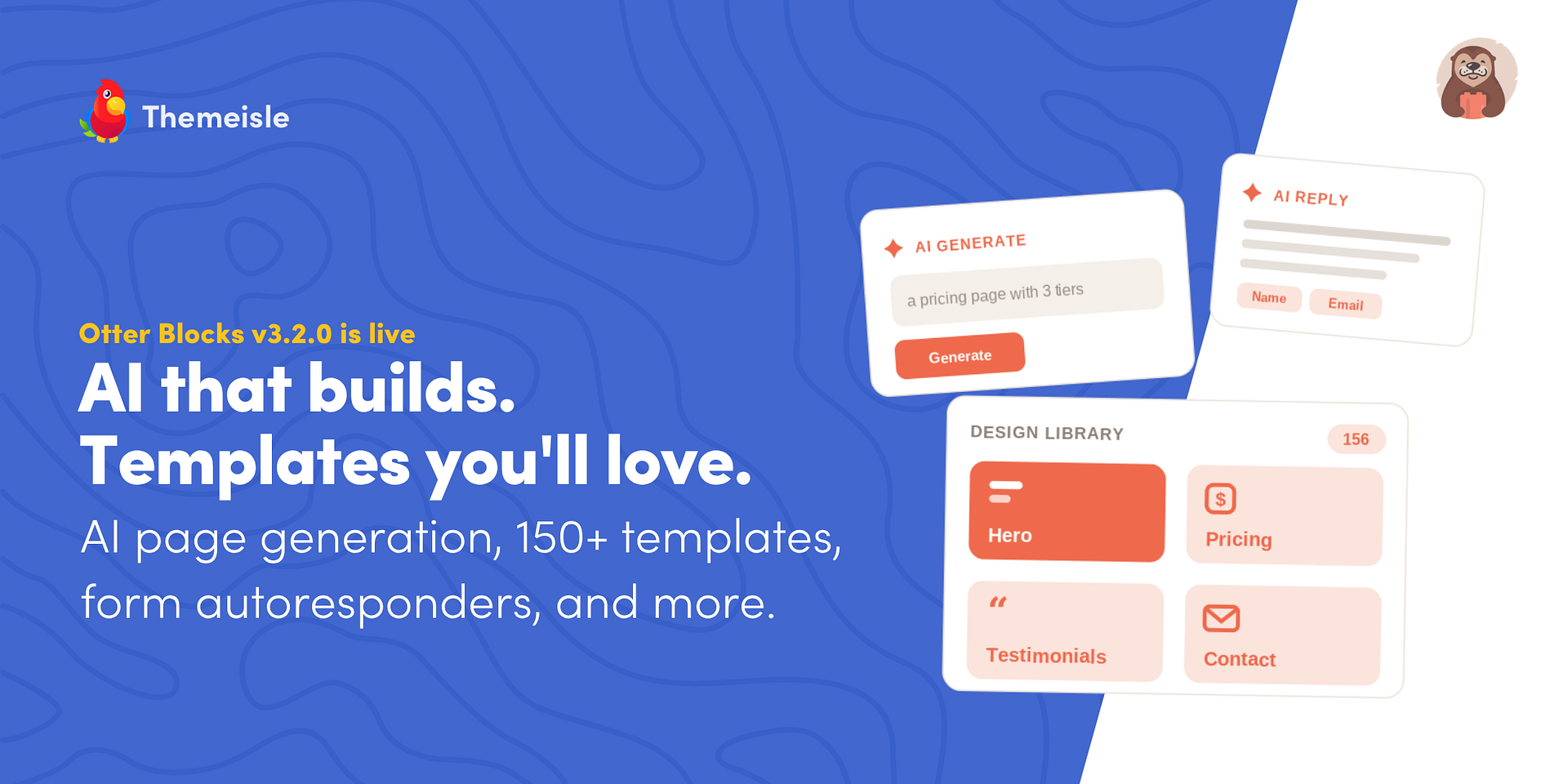
Otter Blocks 3.2.0 is now live, bringing AI that builds full sections and pages, a redesigned AI writing toolbar, AI form autoresponders, a completely rebuilt Design Library, a new Content Slider block, more reliable forms, and full WordPress 7.0 support. This release focuses on the slowest part of building in the block editor: getting started….
The post Otter Blocks 3.2.0: AI Page Building and a New Design Library appeared first on Themeisle Blog.
Themeisle Blog

 Gigi Hadid and Bradley Cooper have been hitting the runways.
Indeed, the model and the Silver Linings Playbook star are no stranger to the tarmac, jetsetting from New York City to Paris in one…
E! Online (US) – Top Stories

AI assistants like Claude Code, Cowork, and ChatGPT are incredible productivity boosters, and if you wished that you could connect these AI tools with WordPress directly, then you’re not alone.
Lately, I have been using WordPress MCP by WPVibe to let my AI assistant manage my website, and it’s truly amazing how much time this saves. You can simply ask it to create a post, upload image, handle admin tasks, and more from a single conversational prompt.
In this step by step tutorial, I’ll show you how to connect your favorite AI tools with WordPress using MCP along with sharing a few work examples, so you can see what becomes possible when you combine WordPress + AI.
You can use the quick links below to jump to any section:
MCP stands for Model Context Protocol. It is as an open standard that lets AI assistants connect to outside tools and services.
Think of it as a universal adapter. Instead of every AI tool building a custom integration with every service, they all speak the same language, so any tool and service that support MCP can work together.
With a WordPress MCP, your AI assistant can see what your website supports and carry out tasks from a plain-text prompt. It does this using a connection WordPress already has built in (the REST API), so there’s nothing extra to install.
You can use WordPress MCP to manage your WordPress site and perform tasks including:
Each of these can be done from a plain-text prompt from your favorite AI tool like Claude Code, Cursor, ChatGPT, etc. I’ll show you the exact prompts once you’re fully set up.
http:// sites. See our guide on how to add SSL and HTTPS to WordPress.The easiest way to add MCP to a self-hosted WordPress site is with WPVibe.ai. It’s free and runs on a hosted server, so there’s no infrastructure to configure. It also works with every major AI tool through a single setup.
You can read our full WPVibe review for a deeper look at everything it can do, but this guide covers what you need to get connected.
Other ways to set this up: There’s also an official WordPress MCP Adapter, which pairs with the new Abilities API in WordPress 6.9, but it’s built for developers and needs manual configuration.
First, you will need to install and activate the free WPVibe plugin. If you need any help, our guide on how to install a WordPress plugin covers each step.
Along with connecting your AI tools, the WPVibe plugin unlocks WP-CLI commands, theme file editing, and the plugin abilities that I talk about later in this guide.
Once activated, go to Vibe AI » Vibe AI in your WordPress dashboard. You’ll see the MCP server URL and a three-step setup guide.
Keep this tab open. You’ll need the URL in the next step.
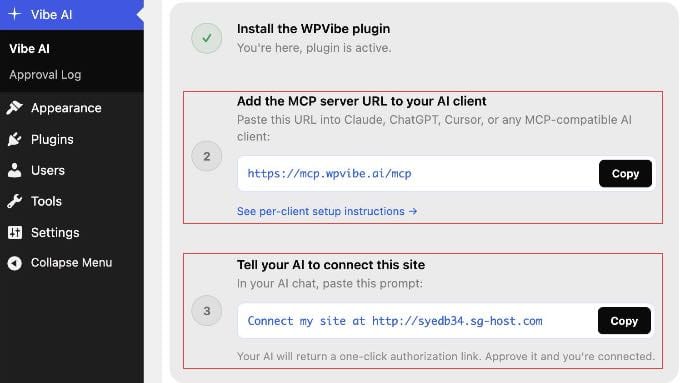
With WPVibe set up, connecting your AI tool takes under a minute. You add the same server URL to any AI client you use: https://mcp.wpvibe.ai/mcp.
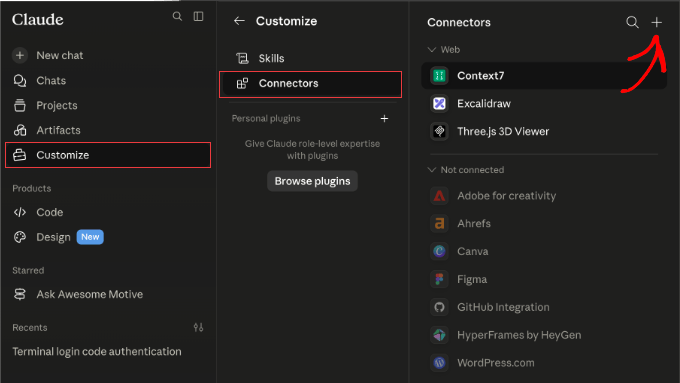
You’ll find instructions on how to do this in the official WPVibe documentation. But let me show you exactly where to find that setting in some popular AI platforms.
If you’re just getting started, I recommend beginning with Claude.
The simplest method is to add the WPVibe URL once via Claude.ai on the web, and it syncs automatically to Claude Desktop, Claude Code, and the Claude mobile apps with no separate setup needed.
Note: On Team and Enterprise workspaces, only an Owner or Admin can add connectors. Individual members on those plans can authenticate with WPVibe once the admin has added it, or use the Claude Code method in step 3 below.
https://mcp.wpvibe.ai/mcp.claude mcp add --scope user wpvibe --transport http https://mcp.wpvibe.ai/mcp. Then, open Claude Code, type /mcp, select wpvibe, and choose ‘Authenticate’.Once saved, follow the on-screen prompt to authorize your WordPress site.
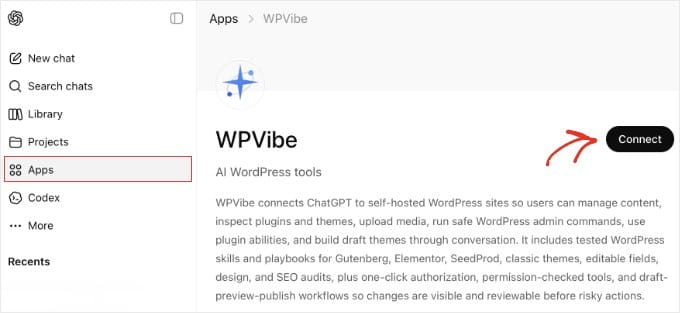
WPVibe is available directly in the ChatGPT App Marketplace, so both free and paid users can connect without copying server URLs or editing config files.
In ChatGPT, click ‘Apps’ in the sidebar and search for WPVibe. Then click ‘Connect’ on the app page and sign in with your WPVibe account when prompted.
After connecting, ChatGPT pre-fills ‘@WPVibe’ at the start of each message. You can delete it with backspace for prompts unrelated to WordPress. Leave it in place when following the authorization step below.
Cursor adds MCP servers through a JSON config file. In Cursor, go to Settings » MCP and click the ‘Add new global MCP server’ button. This opens the mcp.json file.
Add the following entry and save:
{
  "mcpServers": {
    "wpvibe": {
      "url": "https://mcp.wpvibe.ai/mcp"
    }
  }
}
Make sure you restart Cursor after saving.
WPVibe will appear in the MCP list once it connects.
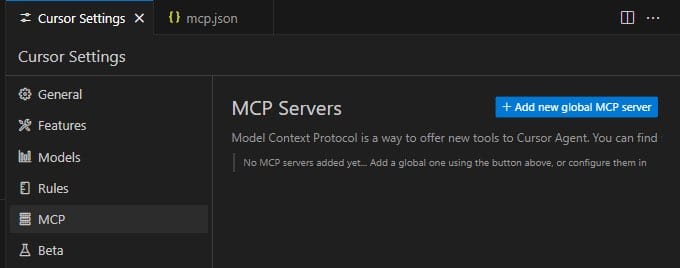
In Windsurf, open the Cascade panel and click the ‘Plugins’ icon (puzzle piece). Search for WPVibe, click ‘Enable’, and complete the sign-in flow when prompted.
To configure manually instead, edit ~/.codeium/windsurf/mcp_config.json and add the following, then restart Windsurf:
{
  "mcpServers": {
    "wpvibe": {
      "serverUrl": "https://mcp.wpvibe.ai/mcp"
    }
  }
}
Note: Windsurf uses serverUrl (not url) in its config file. Using the wrong key will cause the connection to fail.
With the MCP URL added to your AI client, go back to Vibe AI » Vibe AI in your WordPress dashboard.
Under step 3, you’ll find a ready-to-copy prompt with your site’s URL already filled in.
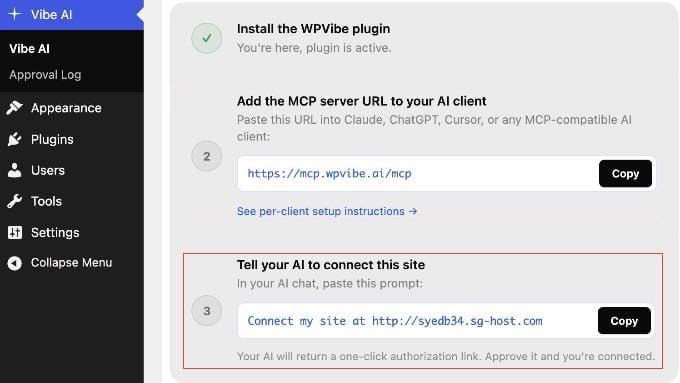
Paste that prompt into your AI chat. Your AI assistant will call WPVibe and return a one-click authorization link. Simply click it to approve the connection.
You never see or copy a password. WordPress and WPVibe handle the credentials securely in the background.
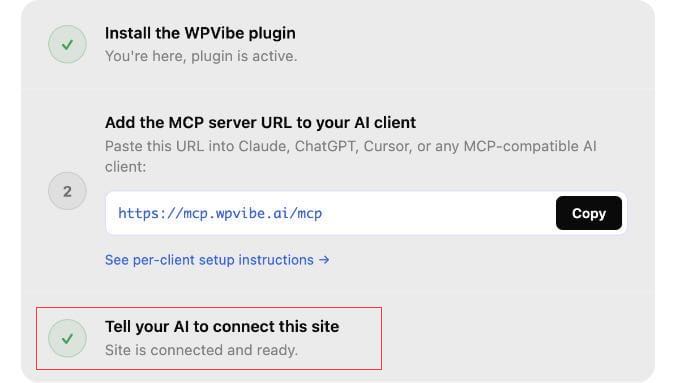
Once your AI tool is connected to WordPress, here are the first prompts I tried, including one for WooCommerce store owners.
My examples are from Claude Code terminal, but these will work with whichever AI tool you connected.
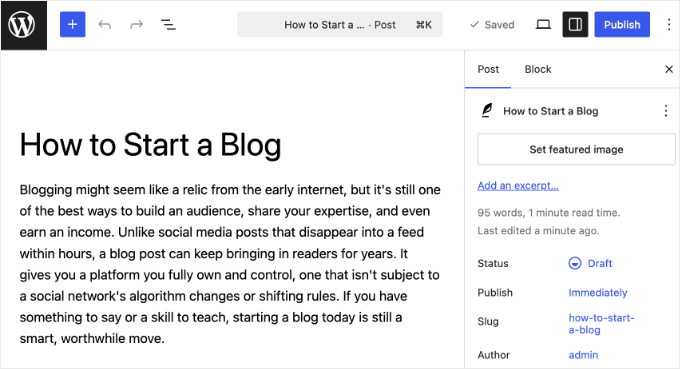
Type this into your AI tool: ‘Create a draft WordPress post titled “How to Start a Blog” with an intro paragraph explaining why blogging is still worth it.’
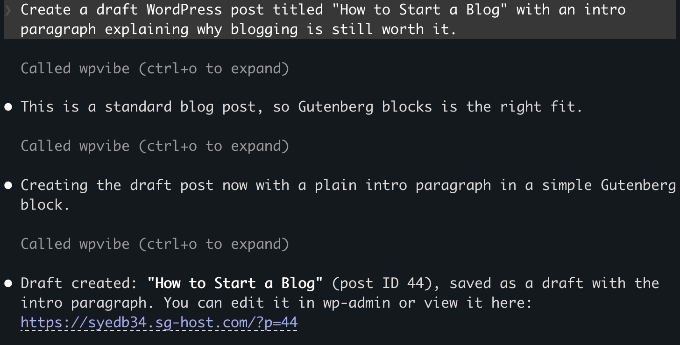
Your AI assistant calls the WordPress REST API, saves the post as a draft, and returns a confirmation with a link to edit it in wp-admin.
Nothing goes live until you choose to publish it yourself.
Type: ‘Upload this image to my WordPress media library: [paste a public image URL]. Set the alt text to “A person working at a laptop”.’
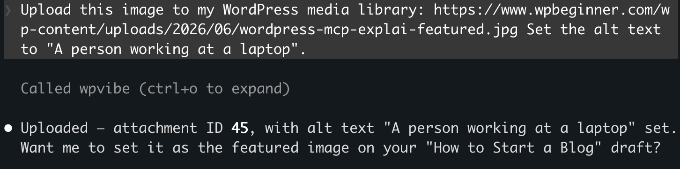
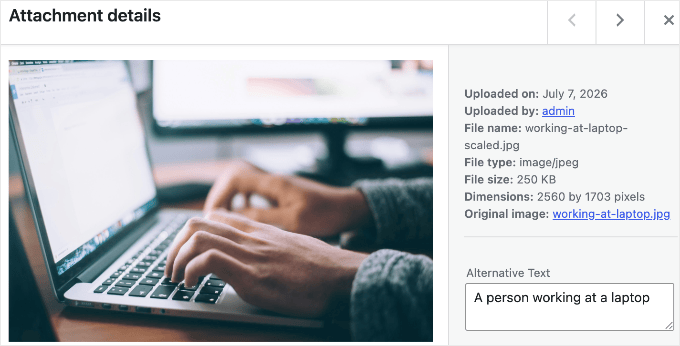
WPVibe validates the source URL, downloads the image, and adds it to your media library with the alt text you specified.
You can reference it in any post from there.
Note: The prompt above uses a public URL, which is the simplest approach. Uploading a local file from your computer works too, but WPVibe will generate a browser upload link as an intermediate step.
WooCommerce 10.9 ships with native MCP support, which exposes product and order abilities through the same standard that WPVibe uses.
If your site runs WooCommerce, try: ‘Draft a new product called “Summer T-Shirt” with a short description and a price of $29.95.’
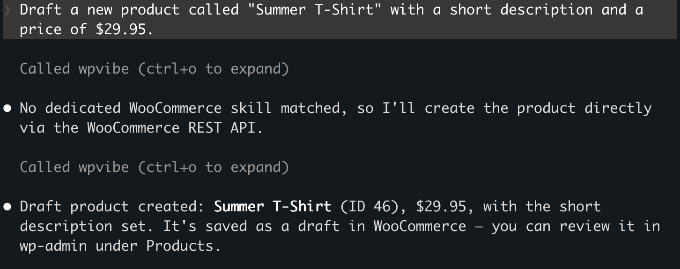
The product saves as a draft in your store. Beyond creating products, your AI can also query orders, update their status, and add order notes, so you can handle routine store admin from the same chat window.
You can see the example below.
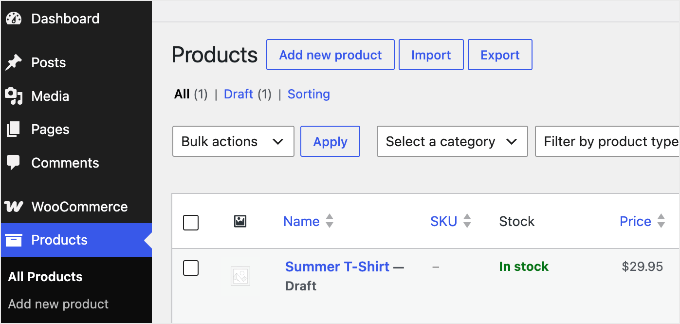
The next three examples go beyond WordPress’s built-in actions. On WordPress 6.9 or later, plugins can register their own actions (called ‘abilities’) that your AI discovers automatically, so if you use these tools, you can drive them from the same chat.
If you use AIOSEO, then you can ask your AI to handle common SEO tasks from the chat window. It can check TruSEO scores, generate meta titles and descriptions, and run SEO audits.
My starting point was to ask it to find every post missing a meta description and write one for each.
Try this prompt: ‘Find all posts missing meta descriptions and write and apply them in one go.’
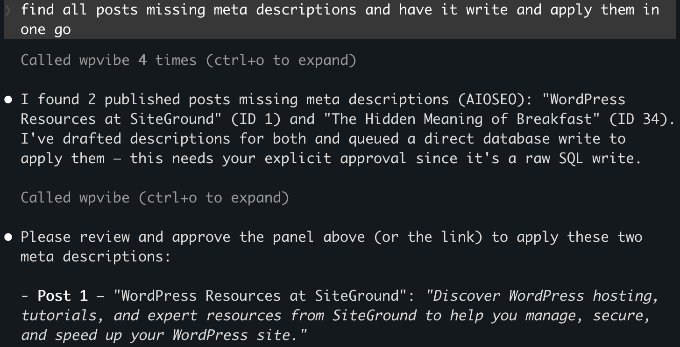
Your AI checks every post, writes the missing meta descriptions, and applies them through AIOSEO in one step.
See our complete AIOSEO setup guide to get it configured first.
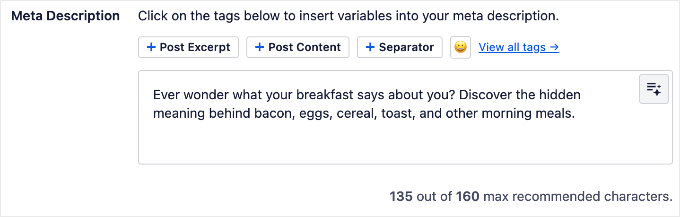
If you use SeedProd, then your AI can manage your coming soon page, maintenance mode, and landing page settings without going into wp-admin.
For example: ‘Check if maintenance mode is currently active’ or ‘Enable the coming soon page.’
If you use WPForms, then your AI can build forms from a plain-English description.
Try: ‘Create a contact form with name, email, and a message field.’ WPForms creates the form in your dashboard, ready to configure and embed.
Before using this, make sure you enable write access under WPForms » Tools.
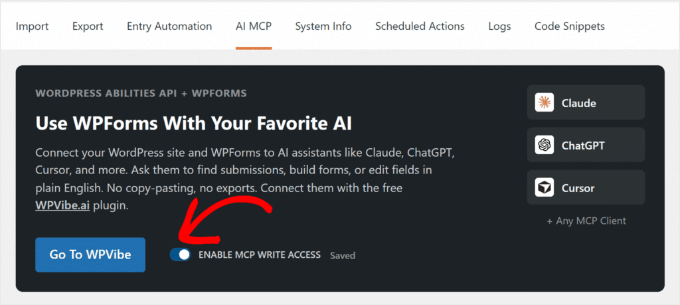
WPForms Lite supports basic field types. Paid plans add phone, date/time, file upload, and more.
You don’t have to guess which of your plugins support this. Because WPVibe automatically discovers every registered ability, you can just ask your connected AI: ‘What can you do on my WordPress site?’
It will list the abilities your installed plugins expose, so the answer stays accurate no matter which plugins you run.
I had the same concern when I first tested this. Here’s how WPVibe handles security.
WordPress manages the connection using application passwords, a built-in feature that creates a separate password for each external tool you connect. The AI only gets the permissions of the user account you connected.
So, it’s worth connecting with a limited, non-admin account rather than your main administrator login. If you create a dedicated Editor-role user for the connection, then the AI can only do what an Editor can do.
WPVibe encrypts your application password before storing it, using a separate key for each site, and keeps it on secure servers hosted by Cloudflare. Every connection between your AI client, WPVibe, and your WordPress site is encrypted too, so your credentials are never exposed along the way.
WPVibe also doesn’t store your conversation content. It stays within your AI client.
On the WordPress side, new posts always save as drafts and deletions go to the trash rather than permanent deletion.
To fully revoke access at any time, go to Users » Profile in your WordPress dashboard and scroll down to the Application Passwords section to delete it.
Connecting your AI client to WordPress is the step that trips people up most often.
If the connection fails or WPVibe doesn’t appear, then work through these checks:
serverUrl key, not url. The wrong key produces no error message, so double-check it.http://.https://mcp.wpvibe.ai/mcp.Is WPVibe free?
Yes. WPVibe has no API key costs and everything in this guide works on the free plan. There is now a paid Pro plan (early-access pricing, $99 per year) that adds higher daily usage limits and priority support, not new features, so you don’t need it for anything covered here.
Does WordPress MCP work with all AI tools?
WPVibe works with Claude.ai (web), Claude Desktop, Claude Code, ChatGPT, Cursor, and Windsurf. Because MCP is an open protocol, any new AI tool that adopts the standard will work with the same WPVibe setup automatically.
Does WordPress MCP work with WordPress.com?
No, not through WPVibe. WordPress.com has its own built-in MCP setup that works differently. This guide covers self-hosted WordPress (WordPress.org) only.
Do I need WordPress 6.9 to use MCP?
No. You can create posts, upload media, and run admin tasks on WordPress 6.0 or later. WordPress 6.9 is only required if you want to use plugin abilities like those from All in One SEO or SeedProd.
Can I connect more than one WordPress site to WPVibe?
Yes. WPVibe supports multiple sites under one free account. Install the Vibe AI plugin on each additional site and complete the site authorization step. Your existing WPVibe account covers all your sites.
What happens if I disconnect WPVibe from my site?
You can remove a site from WPVibe in the plugin admin or on wpvibe.ai at any time. To fully revoke access, also delete the credential under Users » Profile » Application Passwords.
I hope this article helped you get WordPress MCP set up on your site. You may also want to see our guide on the best AI Automation Tools for WordPress.
If you liked this article, then please subscribe to our YouTube Channel for WordPress video tutorials. You can also find us on Twitter and Facebook.
The post How to Connect AI Agents With WordPress using MCP (Step by Step) first appeared on WPBeginner.
WPBeginner

 Jennifer Pedranti’s son is learning a valuable lesson.
The Real Housewives of Orange County star—who shares kids Harrison, 22, Dawson, 19, Greyson, 16, Everleigh, 14, and Dominic, 12, with…
E! Online (US) – Top Stories

Not all flours are created the same, and this one particular brand is highly regarded for making the crispiest and crunchiest fried chicken coating.

Mashed – Fast Food, Celebrity Chefs, Grocery, Reviews