(The Center Square) – As budget negotiations continue for the Pennsylvania General Assembly, Gov. Josh Shapiro provided an update on Thursday hinting that a deal may be close.









(The Center Square) – As budget negotiations continue for the Pennsylvania General Assembly, Gov. Josh Shapiro provided an update on Thursday hinting that a deal may be close.

AI assistants like Claude Code, Cowork, and ChatGPT are incredible productivity boosters, and if you wished that you could connect these AI tools with WordPress directly, then you’re not alone.
Lately, I have been using WordPress MCP by WPVibe to let my AI assistant manage my website, and it’s truly amazing how much time this saves. You can simply ask it to create a post, upload image, handle admin tasks, and more from a single conversational prompt.
In this step by step tutorial, I’ll show you how to connect your favorite AI tools with WordPress using MCP along with sharing a few work examples, so you can see what becomes possible when you combine WordPress + AI.
You can use the quick links below to jump to any section:
MCP stands for Model Context Protocol. It is as an open standard that lets AI assistants connect to outside tools and services.
Think of it as a universal adapter. Instead of every AI tool building a custom integration with every service, they all speak the same language, so any tool and service that support MCP can work together.
With a WordPress MCP, your AI assistant can see what your website supports and carry out tasks from a plain-text prompt. It does this using a connection WordPress already has built in (the REST API), so there’s nothing extra to install.
You can use WordPress MCP to manage your WordPress site and perform tasks including:
Each of these can be done from a plain-text prompt from your favorite AI tool like Claude Code, Cursor, ChatGPT, etc. I’ll show you the exact prompts once you’re fully set up.
http:// sites. See our guide on how to add SSL and HTTPS to WordPress.The easiest way to add MCP to a self-hosted WordPress site is with WPVibe.ai. It’s free and runs on a hosted server, so there’s no infrastructure to configure. It also works with every major AI tool through a single setup.
You can read our full WPVibe review for a deeper look at everything it can do, but this guide covers what you need to get connected.
Other ways to set this up: There’s also an official WordPress MCP Adapter, which pairs with the new Abilities API in WordPress 6.9, but it’s built for developers and needs manual configuration.
First, you will need to install and activate the free WPVibe plugin. If you need any help, our guide on how to install a WordPress plugin covers each step.
Along with connecting your AI tools, the WPVibe plugin unlocks WP-CLI commands, theme file editing, and the plugin abilities that I talk about later in this guide.
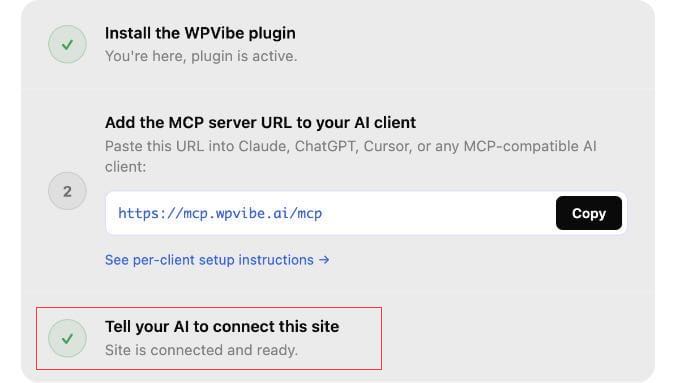
Once activated, go to Vibe AI » Vibe AI in your WordPress dashboard. You’ll see the MCP server URL and a three-step setup guide.
Keep this tab open. You’ll need the URL in the next step.
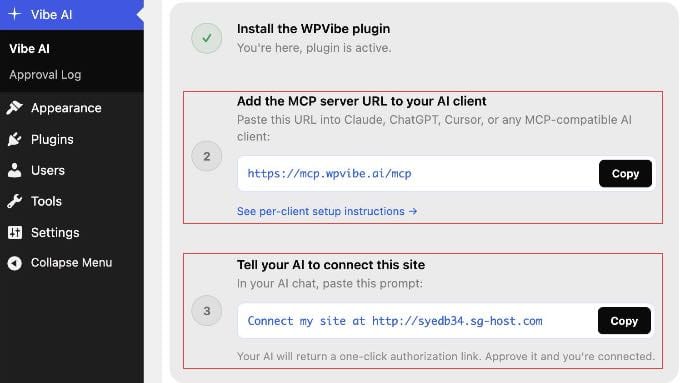
With WPVibe set up, connecting your AI tool takes under a minute. You add the same server URL to any AI client you use: https://mcp.wpvibe.ai/mcp.
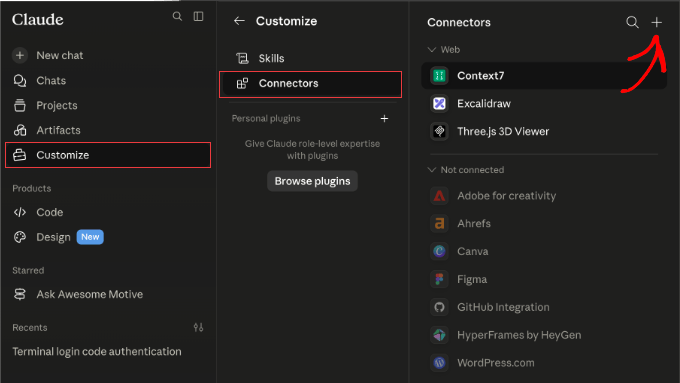
You’ll find instructions on how to do this in the official WPVibe documentation. But let me show you exactly where to find that setting in some popular AI platforms.
If you’re just getting started, I recommend beginning with Claude.
The simplest method is to add the WPVibe URL once via Claude.ai on the web, and it syncs automatically to Claude Desktop, Claude Code, and the Claude mobile apps with no separate setup needed.
Note: On Team and Enterprise workspaces, only an Owner or Admin can add connectors. Individual members on those plans can authenticate with WPVibe once the admin has added it, or use the Claude Code method in step 3 below.
https://mcp.wpvibe.ai/mcp.claude mcp add --scope user wpvibe --transport http https://mcp.wpvibe.ai/mcp. Then, open Claude Code, type /mcp, select wpvibe, and choose ‘Authenticate’.Once saved, follow the on-screen prompt to authorize your WordPress site.
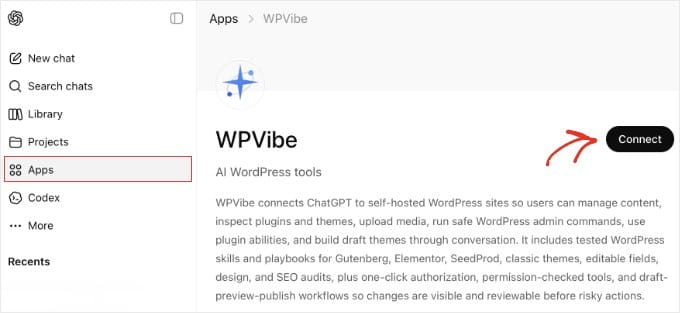
WPVibe is available directly in the ChatGPT App Marketplace, so both free and paid users can connect without copying server URLs or editing config files.
In ChatGPT, click ‘Apps’ in the sidebar and search for WPVibe. Then click ‘Connect’ on the app page and sign in with your WPVibe account when prompted.
After connecting, ChatGPT pre-fills ‘@WPVibe’ at the start of each message. You can delete it with backspace for prompts unrelated to WordPress. Leave it in place when following the authorization step below.
Cursor adds MCP servers through a JSON config file. In Cursor, go to Settings » MCP and click the ‘Add new global MCP server’ button. This opens the mcp.json file.
Add the following entry and save:
{
  "mcpServers": {
    "wpvibe": {
      "url": "https://mcp.wpvibe.ai/mcp"
    }
  }
}
Make sure you restart Cursor after saving.
WPVibe will appear in the MCP list once it connects.

In Windsurf, open the Cascade panel and click the ‘Plugins’ icon (puzzle piece). Search for WPVibe, click ‘Enable’, and complete the sign-in flow when prompted.
To configure manually instead, edit ~/.codeium/windsurf/mcp_config.json and add the following, then restart Windsurf:
{
  "mcpServers": {
    "wpvibe": {
      "serverUrl": "https://mcp.wpvibe.ai/mcp"
    }
  }
}
Note: Windsurf uses serverUrl (not url) in its config file. Using the wrong key will cause the connection to fail.
With the MCP URL added to your AI client, go back to Vibe AI » Vibe AI in your WordPress dashboard.
Under step 3, you’ll find a ready-to-copy prompt with your site’s URL already filled in.
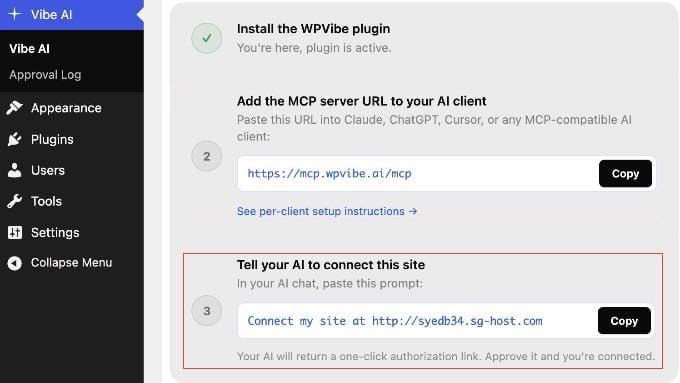
Paste that prompt into your AI chat. Your AI assistant will call WPVibe and return a one-click authorization link. Simply click it to approve the connection.
You never see or copy a password. WordPress and WPVibe handle the credentials securely in the background.
Once your AI tool is connected to WordPress, here are the first prompts I tried, including one for WooCommerce store owners.
My examples are from Claude Code terminal, but these will work with whichever AI tool you connected.
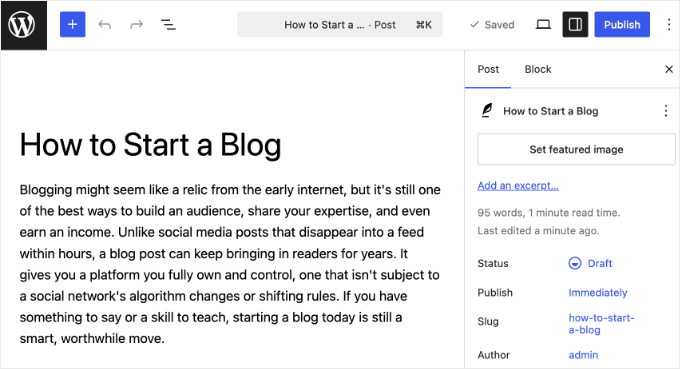
Type this into your AI tool: ‘Create a draft WordPress post titled “How to Start a Blog” with an intro paragraph explaining why blogging is still worth it.’
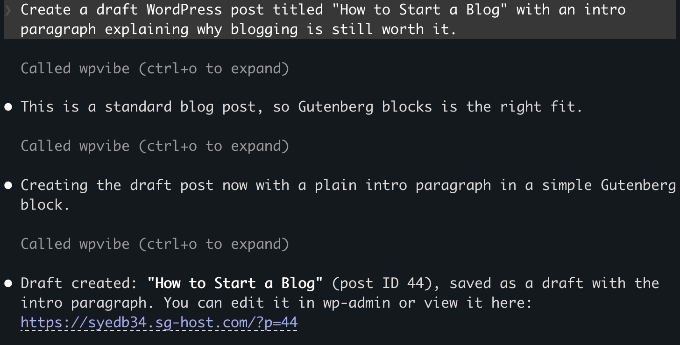
Your AI assistant calls the WordPress REST API, saves the post as a draft, and returns a confirmation with a link to edit it in wp-admin.
Nothing goes live until you choose to publish it yourself.
Type: ‘Upload this image to my WordPress media library: [paste a public image URL]. Set the alt text to “A person working at a laptop”.’
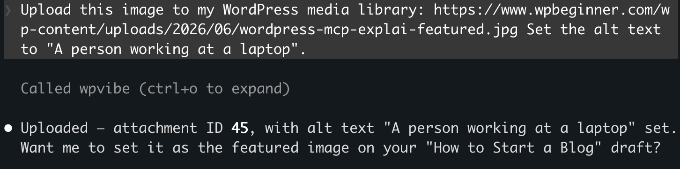
WPVibe validates the source URL, downloads the image, and adds it to your media library with the alt text you specified.
You can reference it in any post from there.
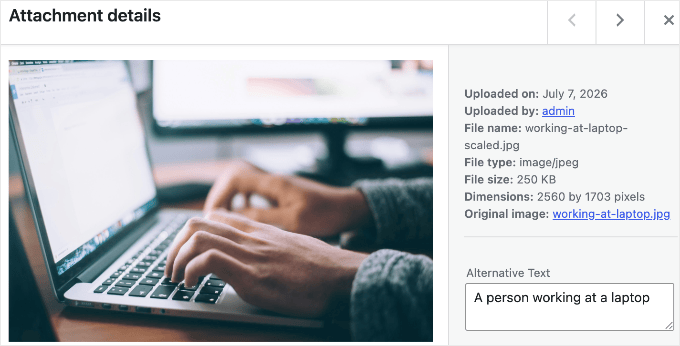
Note: The prompt above uses a public URL, which is the simplest approach. Uploading a local file from your computer works too, but WPVibe will generate a browser upload link as an intermediate step.
WooCommerce 10.9 ships with native MCP support, which exposes product and order abilities through the same standard that WPVibe uses.
If your site runs WooCommerce, try: ‘Draft a new product called “Summer T-Shirt” with a short description and a price of $29.95.’
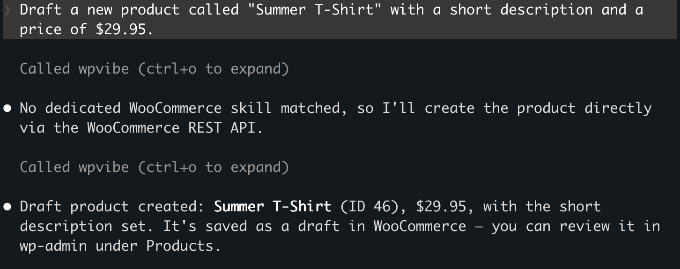
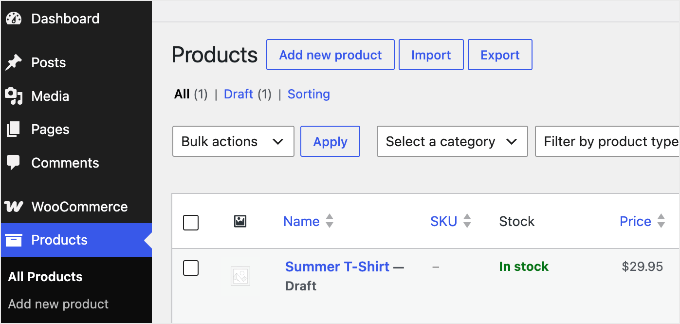
The product saves as a draft in your store. Beyond creating products, your AI can also query orders, update their status, and add order notes, so you can handle routine store admin from the same chat window.
You can see the example below.
The next three examples go beyond WordPress’s built-in actions. On WordPress 6.9 or later, plugins can register their own actions (called ‘abilities’) that your AI discovers automatically, so if you use these tools, you can drive them from the same chat.
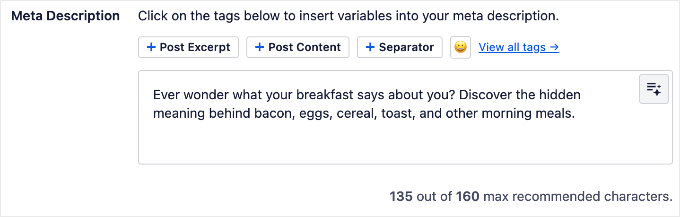
If you use AIOSEO, then you can ask your AI to handle common SEO tasks from the chat window. It can check TruSEO scores, generate meta titles and descriptions, and run SEO audits.
My starting point was to ask it to find every post missing a meta description and write one for each.
Try this prompt: ‘Find all posts missing meta descriptions and write and apply them in one go.’
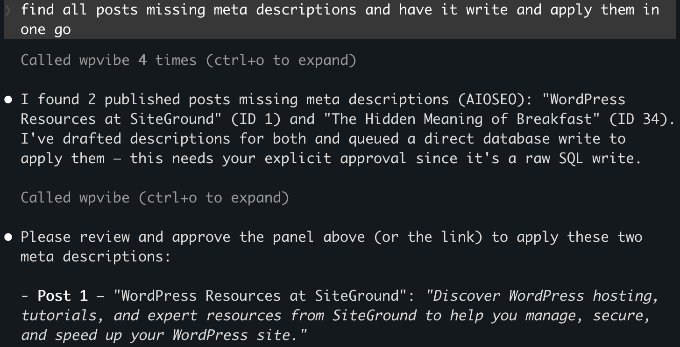
Your AI checks every post, writes the missing meta descriptions, and applies them through AIOSEO in one step.
See our complete AIOSEO setup guide to get it configured first.
If you use SeedProd, then your AI can manage your coming soon page, maintenance mode, and landing page settings without going into wp-admin.
For example: ‘Check if maintenance mode is currently active’ or ‘Enable the coming soon page.’
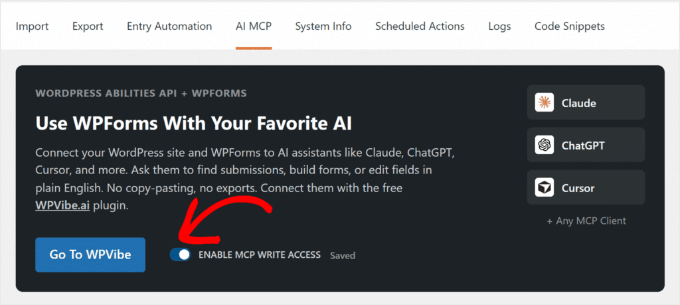
If you use WPForms, then your AI can build forms from a plain-English description.
Try: ‘Create a contact form with name, email, and a message field.’ WPForms creates the form in your dashboard, ready to configure and embed.
Before using this, make sure you enable write access under WPForms » Tools.
WPForms Lite supports basic field types. Paid plans add phone, date/time, file upload, and more.
You don’t have to guess which of your plugins support this. Because WPVibe automatically discovers every registered ability, you can just ask your connected AI: ‘What can you do on my WordPress site?’
It will list the abilities your installed plugins expose, so the answer stays accurate no matter which plugins you run.
I had the same concern when I first tested this. Here’s how WPVibe handles security.
WordPress manages the connection using application passwords, a built-in feature that creates a separate password for each external tool you connect. The AI only gets the permissions of the user account you connected.
So, it’s worth connecting with a limited, non-admin account rather than your main administrator login. If you create a dedicated Editor-role user for the connection, then the AI can only do what an Editor can do.
WPVibe encrypts your application password before storing it, using a separate key for each site, and keeps it on secure servers hosted by Cloudflare. Every connection between your AI client, WPVibe, and your WordPress site is encrypted too, so your credentials are never exposed along the way.
WPVibe also doesn’t store your conversation content. It stays within your AI client.
On the WordPress side, new posts always save as drafts and deletions go to the trash rather than permanent deletion.
To fully revoke access at any time, go to Users » Profile in your WordPress dashboard and scroll down to the Application Passwords section to delete it.
Connecting your AI client to WordPress is the step that trips people up most often.
If the connection fails or WPVibe doesn’t appear, then work through these checks:
serverUrl key, not url. The wrong key produces no error message, so double-check it.http://.https://mcp.wpvibe.ai/mcp.Is WPVibe free?
Yes. WPVibe has no API key costs and everything in this guide works on the free plan. There is now a paid Pro plan (early-access pricing, $99 per year) that adds higher daily usage limits and priority support, not new features, so you don’t need it for anything covered here.
Does WordPress MCP work with all AI tools?
WPVibe works with Claude.ai (web), Claude Desktop, Claude Code, ChatGPT, Cursor, and Windsurf. Because MCP is an open protocol, any new AI tool that adopts the standard will work with the same WPVibe setup automatically.
Does WordPress MCP work with WordPress.com?
No, not through WPVibe. WordPress.com has its own built-in MCP setup that works differently. This guide covers self-hosted WordPress (WordPress.org) only.
Do I need WordPress 6.9 to use MCP?
No. You can create posts, upload media, and run admin tasks on WordPress 6.0 or later. WordPress 6.9 is only required if you want to use plugin abilities like those from All in One SEO or SeedProd.
Can I connect more than one WordPress site to WPVibe?
Yes. WPVibe supports multiple sites under one free account. Install the Vibe AI plugin on each additional site and complete the site authorization step. Your existing WPVibe account covers all your sites.
What happens if I disconnect WPVibe from my site?
You can remove a site from WPVibe in the plugin admin or on wpvibe.ai at any time. To fully revoke access, also delete the credential under Users » Profile » Application Passwords.
I hope this article helped you get WordPress MCP set up on your site. You may also want to see our guide on the best AI Automation Tools for WordPress.
If you liked this article, then please subscribe to our YouTube Channel for WordPress video tutorials. You can also find us on Twitter and Facebook.
The post How to Connect AI Agents With WordPress using MCP (Step by Step) first appeared on WPBeginner.
WPBeginner

Some celebrities, like Ryan Seacrest and Hailey Bieber, swear by a supposedly healthy morning routine that not a lot of people might have the stomach for.

Health Digest – Health News, Wellness, Expert Insights

 Jennifer Pedranti’s son is learning a valuable lesson.
The Real Housewives of Orange County star—who shares kids Harrison, 22, Dawson, 19, Greyson, 16, Everleigh, 14, and Dominic, 12, with…
E! Online (US) – Top Stories
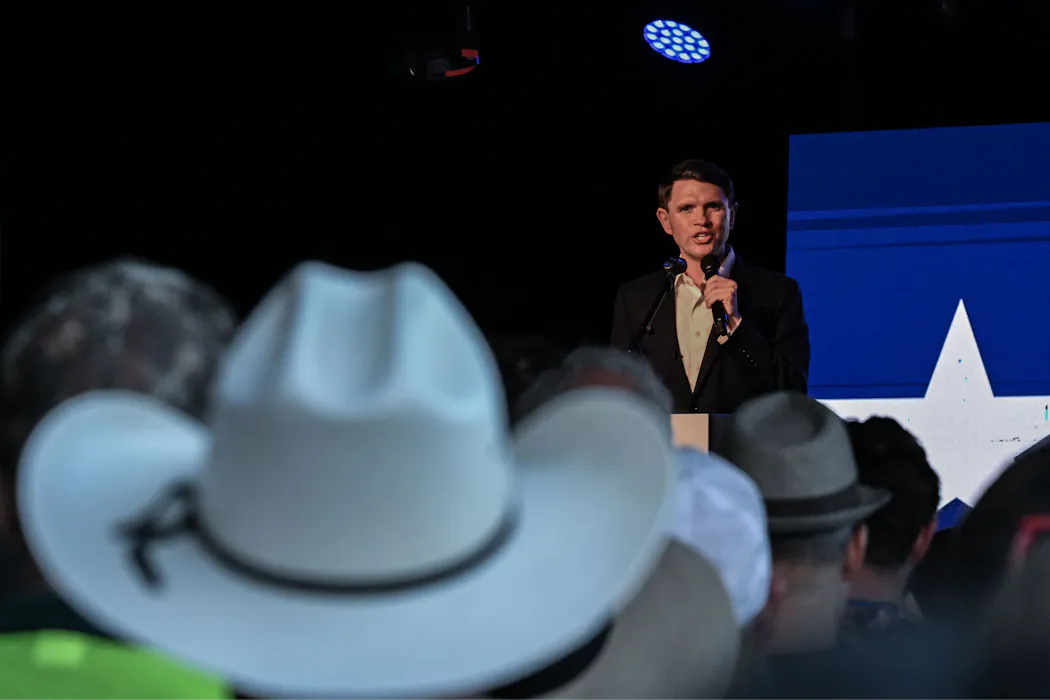
The 2026 midterms are here, and negative campaign messaging is flooding screens across the U.S. In Texas’ Senate race, Republican Attorney General Ken Paxton’s comments about Democratic Texas Rep. James Talarico have gone viral.
Rather than simply suggesting Talarico is weak on border security or inflation economics, Paxton’s campaign has taken a different rhetorical approach. To quote Fox News host Jesse Watters, “The major factor in this race … is whether Tala-freak-o is a vegan.”
Though Talarico maintains he is not vegan, Paxton has referred to his opponent as “Tofu Talarico.”
Paxton and Watters aren’t the only ones making these dietary accusations.
Earlier this year, after Talarico ordered a potato, egg and cheese taco from a restaurant in Austin, Texas Gov. Greg Abbott posted to his campaign social platform X account: “Homie is not beating the vegetarian allegations.”
Texas Sen. Ted Cruz joked that if a soy latte could speak, “that would be Democrat James Talarico.” Even President Donald Trump has chimed in: “He’s a vegan in Texas, and you can’t get elected as a vegan in Texas.”
Again, Talarico denies being a secret vegetarian or vegan. “I’m an eighth-generation Texan,” he has said. “I’ve been eating barbecue since before Ken Paxton’s first indictment.”
The accusations likely stem from a 2022 appearance with the Texas Humane Legislation Network when Talarico suggested Americans reduce their meat consumption for climate reasons. His girlfriend follows a plant-based diet. Nonetheless, Talarico says that his campaign “runs on barbecue.”
As communication scholars who study the symbolic roles of meat and meat-eating in political communication, we see the construction of “Tofu Talarico” not as a one-off political jab but as part of a more sophisticated rhetorical strategy by which politicians appeal to voters.
Attacks on Talarico show how, across American politics, what people eat is a metaphoric marker of who they are, from political affiliation to regional belonging and cultural values. Eating meat – or not – plays a huge role in the political process, and accusations of meat avoidance, regardless of whether they’re true, can be a potent rhetorical weapon.
Communication scholarship shows that metaphors, when a word or phrase denoting one object or idea is used in place of another, are more than literary decoration; they shape the way we perceive reality, acting as part of a “conceptual system” that enables snap judgments and decision-making.
As mental shortcuts, or heuristic devices, metaphors are common in political communication. They’re a means to “see something in terms of something else.”
For example, in the case of Paxton and Talarico, allegations of vegetarianism and veganism are not about Talarico’s nutritional profile or even his environmental ethics. Here, “vegan” and its analogues metaphorically stand in for weakness and nonconformity, whereas “meat” and its affiliates stand in for strength, traditionalism and the stereotypical Texan way.
This usage is consistent with what food politics researchers call the “sexual politics” of meat, wherein meat imagery is often used in displays of traditional masculinity. This is evident in other jabs levied at Talarico. For example, Watters linked Talarico’s diet to his sexual orientation, joking on Fox News that Talarico was a “gay vegan” with a fake girlfriend.
Dietary preference also links to key political demographics. For example, political scientists have explored whether the concept of a Republican vegan is an oxymoron due to the deep entrenchment of meat-eating and meat production in primarily conservative regions.
Overwhelmingly, vegans tend to be women, young and liberal. Across all political identifications, being male and white correlates with higher meat consumption.
Even the choice of where to purchase meat can be an electoral measure. Political journalist Dave Wasserman has suggested that the 2012 election was a contest between “well-educated, Democratic-trending Whole Foods markets and down-home, Republican-trending Cracker Barrel outposts.”
The “meatless” have long been framed as social and political threats, levied in discussions of whether they should be politically elevated or subordinated. Historically, Western norms during the 19th and 20th centuries held that to not eat meat is odd at best, and suspicious at worst.
In the late 1800s, colonialism in Asia was partially justified on the grounds that Asian men were but “effeminate rice eaters” who, according to 19th-century neurologist James Leonard Corning, lacked “the intellectual vigor of flesh-eating men.”
Negative appeals to veganism again flourished in 2019 after Democratic Representative Alexandria Ocasio-Cortez’s “Green New Deal,” a resolution proposing to combat climate change. Conservative senators like Joni Ernst and Marsha Blackburn attacked the environmentally progressive initiative as a “war on meat,” posing an existential threat to meat eaters and cattle farmers. Notably, the Green New Deal did not contain meat mandates. In the Green New Deal discussion, though, this hypothetical meat ban effectively functioned as metaphorical shortcut for progressive political overreach.
This demarcation is not confined to one political party. In a Democratic primary debate in 2019, New Jersey Senator Cory Booker – a vegan since 2014 – was asked by a debate moderator if, as president, he would demand Americans follow his diet. Booker, surprised by the personal question, said no. He did not win the nomination.
Meat, or lack thereof, has gathered more significance in the second Trump presidency via Health and Human Services Secretary Robert F. Kennedy Jr.’s Make America Healthy Again initiative. Kennedy, who touts his “carnivore diet,” says he “only (eats) meat or fermented foods.” He has even modified the food pyramid – the Department of Agriculture’s visual nutrition guide – shifting red meat from a food to be consumed sparingly to a high dietary priority.
Meanwhile, multiple Republican-leaning states have banned cell-cultured meat, or meat produced in a lab, for not being “real” and, so, being dangerous. After signing a ban on cultured meat, Florida Governor Ron DeSantis declared that the bill represented a battle against the global elite and its “authoritarian goals.”

While the beef between Paxton and Talarico will likely resolve after the 2026 midterms, appeals to meat, meat eaters and meat-eating in U.S. political communication will not.
As available meat substitutes increase, economic burdens on ranchers rise and debates over the meat industry’s impact on climate change intensify, we expect meat’s culture war cachet to surge too.
“Tofu Talarico” is just one of what will be numerous examples of meat symbolizing what the future of the country, its leaders and its citizens should be.

The authors do not work for, consult, own shares in or receive funding from any company or organization that would benefit from this article, and have disclosed no relevant affiliations beyond their academic appointment.
Politics + Society – The Conversation

Not all flours are created the same, and this one particular brand is highly regarded for making the crispiest and crunchiest fried chicken coating.

Mashed – Fast Food, Celebrity Chefs, Grocery, Reviews

Think you could score a World Cup penalty kick against a professional keeper? One in four Americans thinks they could. That’s the findings of a survey of 2,000 people, which found 28% feeling they could convert from the penalty if…
(Photo by Chaos Soccer Gear via Unsplash)
(The Center Square) – Nearly one year after a lower court ruled that Texas universities providing in-state tuition to illegal foreign nationals was illegal, the Fifth Circuit Court of Appeals upheld the decision.
Every week political cartoonists throughout the country and across the political spectrum apply their ink-stained skills to capture the foibles, memes, hypocrisies and other head-slapping events in the world of politics. The fruits of these labors are hundreds of cartoons that entertain and enrage readers of all political stripes. Here’s an offering of the best of this week’s crop, picked fresh off the Toonosphere. Edited by Matt Wuerker.Politics